
How to Track Facebook (Meta) Ads in Voluum: Step-by-Step Guide

To accurately track Facebook (Meta) Ads and measure your campaign conversions, you need to set up tracking with the right tools and methods. This guide will show you how to correctly configure Facebook ad tracking in Voluum, avoid common mistakes, and get clear data to optimize your advertising performance.
Should You Track Facebook Ads with Voluum?
There were more than 5 million advertisers monthly on Facebook last year (according to Reuters). It should not be surprising as the leader of the social network market has more than 2.07 billion monthly active users. Facebook leaves YouTube (1.5 bln) and WhatsApp (1.3 bln) far behind. With such a great, diverse audience, you have unlimited possibilities. Also among Voluum users, Facebook Ads (Meta Ads) is a quite popular source of traffic.
To get a slice of Facebook’s advertising pie you need to get familiar with the right tools and handle your analytics very well. As questions about how to track Facebook ads with Voluum are quite popular, we decided to cover this topic and give the answers to the most common ones:
- Can I add Facebook Ads as a traffic source in Voluum?
- What data can I pass when setting up Facebook Ads as a traffic source?
- How to set up Facebook Ads as a traffic source in Voluum?
- Is it possible to track Facebook Ads conversions with Voluum? How to place a Facebook Ads tracking pixel?
- Can you provide a guide with the best practices for Facebook Ads (Meta Ads) campaigns?
How Do You Track Facebook Ads in Voluum?
Yes, you can integrate Facebook with Voluum and it works the same as any other traffic source. You click the “Create” button in the Traffic sources tab and select either the Facebook or Instagram traffic source templates. This will configure all tracking tokens in Voluum automatically.
Facebook Ads (now Meta Ads) allows you to pass different kinds of data such as source, ad ID, campaign ID/name, age, gender, etc., either dynamically or statically, using tracking tokens. So, for example, if your ad is available in multiple placements, such as Instagram Stories and the Desktop News Feed, the {{placement}} parameter will automatically be replaced with the correct placement value.
You can track the following information with Facebook’s dynamic tokes:
- Campaign ID
- Adset ID
- Ad ID
- Campaign name
- Adset name
- Ad name
- Placement
- Source site name
If you would like to track other information such as age, gender, interests, etc. you need to specify the static value for each single ad in Facebook Ads (now Meta Ads).
What Facebook does not support is the option to track the cost value using tokens. What it means is passing the information about the cost requires manual data entry. Or at least, it would, if Voluum didn’t have the Automizer feature.
How Can Voluum Automizer Improve Facebook Ad Tracking?
Automizer integrates Voluum with Facebook Ads (Meta Ads), and many other traffic sources, on a deeper level than standard tracking methods. With this integration in place, costs will be tracked – something that otherwise was not possible to achieve automatically.
The usual way of tracking costs in affiliate marketing is by passing it in the {cost} token. Facebook however does not support this token. Thus, the only way of having your cost data in Voluum is using the Voluum Automizer.
If you are a Voluum user and wonder, how to get Automizer, I have good news for you – you already have it.
To integrate with Facebook, go to the Automizer tab, then Traffic Sources tab, and click the Add integration button. Select Facebook from the list of available traffic sources.
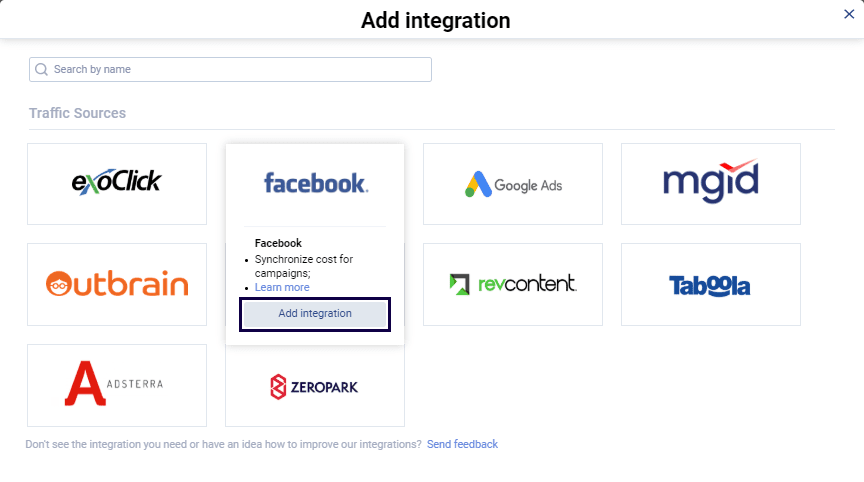
Follow the on-screen instructions to integrate.
What Is Direct Tracking for Facebook Ads in Voluum?
Facebook doesn’t like redirects. That’s a fact. However, Voluum provides you an alternative to a standard redirect tracking that protects your campaigns from Facebook’s watchful eye. This alternative is called the Direct Tracking. It provides you with a special script that you implement on your landing page. This script makes a request to Voluum on a page load with visitor information. So there is no initial redirect through a tracking domain.
- Facebook is happy because it actually sees the visitor’s destination.
- You are happy because the Direct Tracking comes with the same tracking options as you had with a redirect tracking.
- You are also happy, as Direct method of tracking enables you to use first-touch attribution model with your campaigns.
- Voluum is happy because it helped yet another marketer.
Use this direct tracking method when setting up your Facebook campaigns.

How Do You Set Up Facebook Ad Tracking in Voluum?
To set up tracking of Facebook ad traffic you need to, firstly, set up Facebook as a traffic source in your Voluum panel. Select the Facebook traffic source template from the list of available templates.
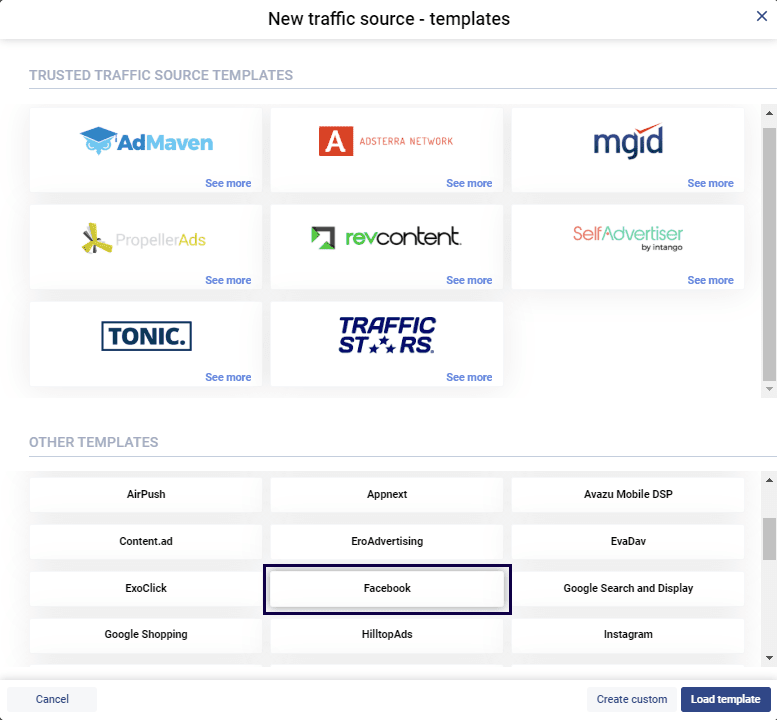
The Direct Tracking Pixel is already enabled for this template. Save this template.
Secondly, click on New campaign and choose Facebook as your traffic source. Fill out all required fields. If you have any doubts about campaign creation, you can check out our knowledge base for more information here.
After you create your Facebook Ads/Meta Ads campaigns, the Direct Tracking URL and Direct Tracking Script will be generated by the system. Save them both in any text editing tool.
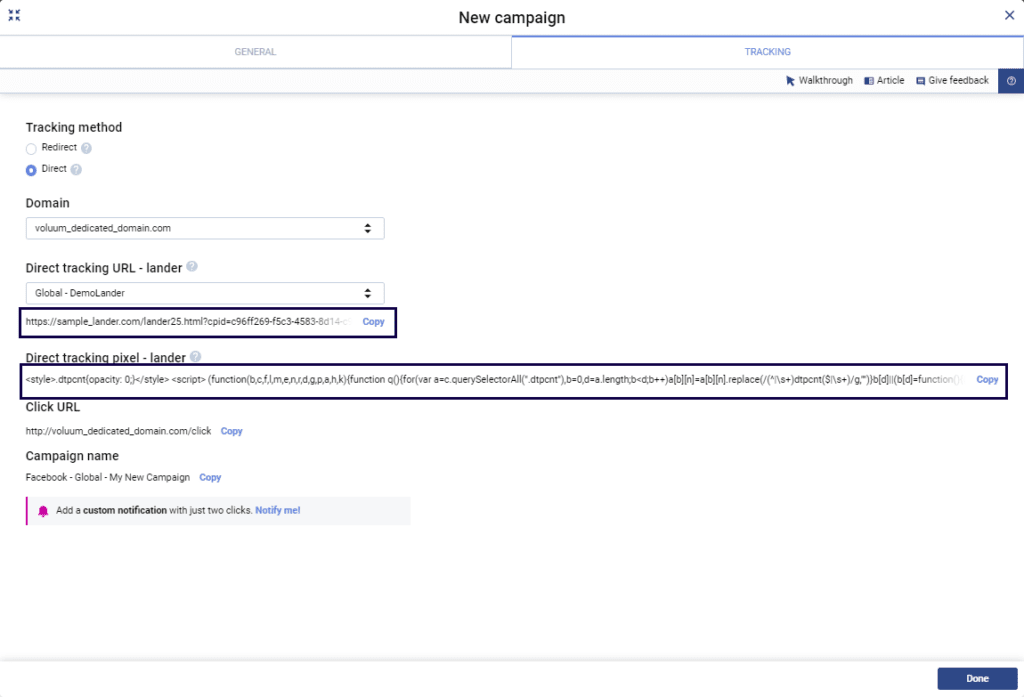
Thirdly, go to your landing page and paste the Direct Tracking Script into your page’s HTML code. Precisely in the <HEAD> section. Like so:
<HEAD>

<TITLE>Sample “Thank You” Page</TITLE>

direct tracking script

</HEAD>
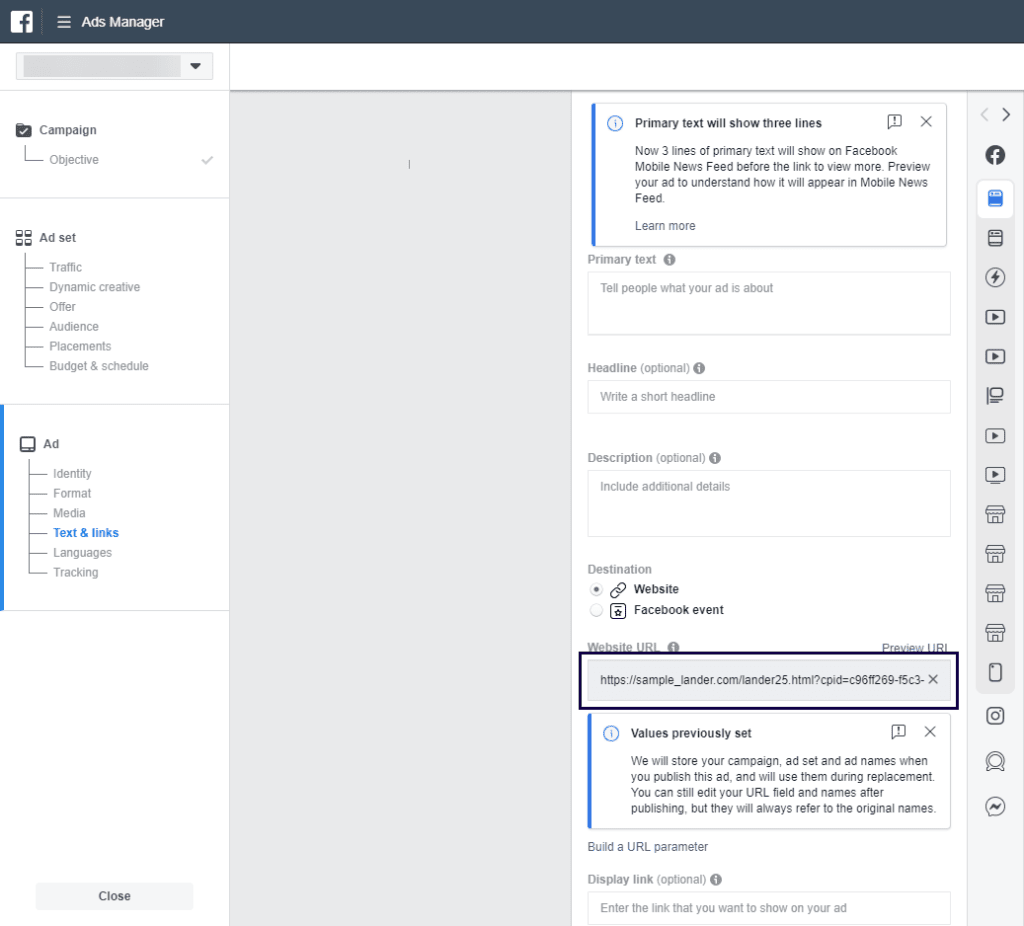
The fourth thing you need to do is to go to your Facebook Ads Manager. Paste your Direct Tracking URL in the Website URL text field. All tracking parameters are already added to the URL. If you want to add additional parameters with static values, you need to add tracking parameters yourself. For example, you can put a parameter for age (“age=18”) and gender (“gender=woman”), separated by the & character. That way, apart from Facebook’s dynamic tokens, you will always pass fixed visitor’s age and gender.
How Do You Add Facebook Tracking Pixel to Voluum?
The last step is to insert the Facebook tracking pixel into Voluum. This step is optional and should be done only if you wish to pass information about conversion from your affiliate network, through Voluum, to Facebook. The Facebook pixel is a small piece of JavaScript code that you copy and paste into key pages along with your conversion funnel.
Voluum only needs a non-script part version of this pixel that looks like a normal URL. Create a pixel in Facebook Ads Manager and get the URL part of the script:
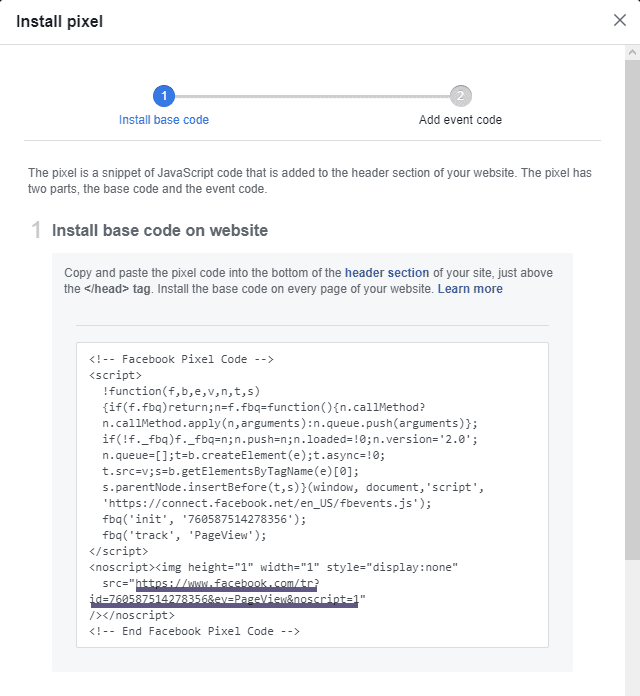
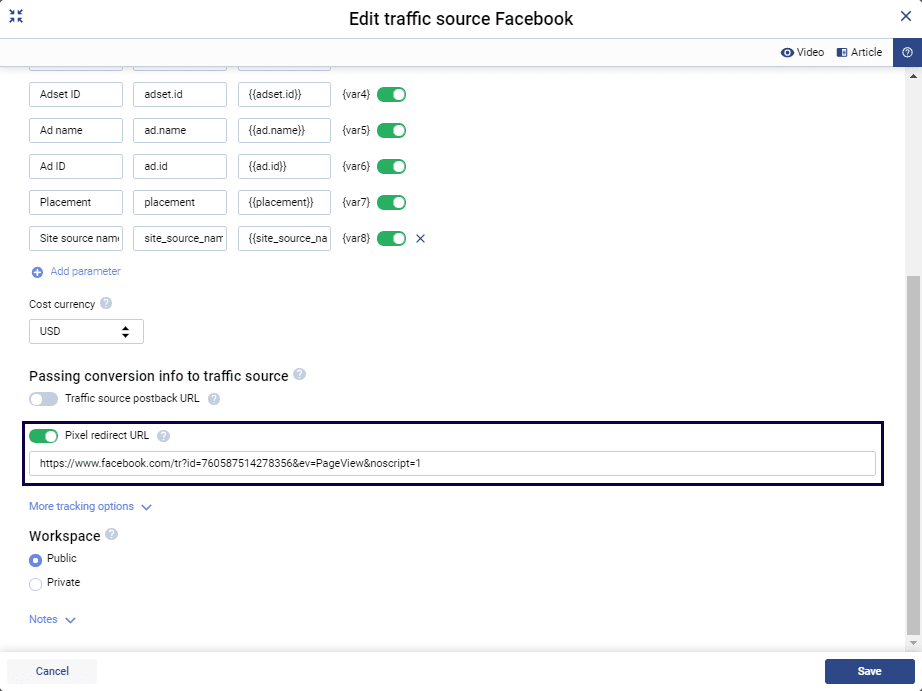
Place the URL that you have copied from Facebook’s pixel in the Pixel redirect URL field in a traffic source form in Voluum.
Remember that the pixel will only work correctly if you use a conversion tracking pixel to track conversions from your offer. Using the S2S postback to report conversions from your affiliate network will not work with Facebook pixel.
If you conduct the setup right, your conversions should be visible in both the Voluum and Facebook panels.
How Can You Track Third-Party Offer Conversions from Facebook Ads in Voluum?
The scenario described above excludes tracking conversion from most affiliate network, as they usually do not allow using a conversion tracking pixel to pass information from the offer to Voluum. Most networks use S2S postbacks. You can use postbacks to pass conversion information to Voluum but you wouldn’t be able to pass this information from Voluum to Facebook using the technique described above.
The Voluum team had developed a solution that enables you to share conversion information with Facebook, even if this information has been recorder using S2S postback.
To use this solution, you need to have a domain of your own which ownership you can prove to Facebook. To set up passing conversions to Facebook Ads from third-party offers, follow the steps below:
- Verify your domain in Facebook. More information can be found in Facebook documentation.
- Get the Conversion API Key and Pixel ID
- Integrate your Voluum and Facebook accounts in Automizer
- Generate the Facebook postback URL in Voluum Automizer
- Submit this postback as your traffic source postback URL in traffic source’s setup in Voluum
Passing conversion to Facebook allows you to utilize Facebook learning algorithms to your advantage.
How Easy Is It to Set Up Facebook Ad Tracking in Voluum?
We hope we answered all your questions regarding tracking Facebook ads. If not – let us know! We’ll be happy to help you with your doubts 😉
After refining your process and accurately setting up your tracking parameters, it’s time to maximize your ROI on Facebook Ads (now Meta Ads). To do so, make sure you are following our best practices.
What Are the Key Steps for Tracking Facebook Ads in Voluum?
- Facebook has more than 5 million advertisers. Monthly!
- You can use Facebook as a Traffic Source in Voluum.
- While using Facebook Pixel, it will work correctly only with the corresponding tracking pixel within Voluum.
- To pass conversion to Facebook from third-party offers that use postbacks by default, you have to verify your domain in Facebook and generate the traffic source postback URL in Voluum
Start Tracking Facebook Ads
with Voluum. Select a plan and register now
Frequently Asked Questions
Question: Can you set up Facebook Ads as a traffic source in Voluum?
Answer: Yes, you can set up Facebook Ads as a traffic source in Voluum by selecting the Facebook or Instagram templates in the Traffic Sources tab, which automatically configures all required tracking tokens for you.
Question: What kind of data can be tracked from Facebook Ads in Voluum?
Answer: Voluum allows tracking of dynamic data including campaign ID, adset ID, ad ID, campaign name, adset name, ad name, placement, and source site name. You can also specify static parameters like age or gender.
Question: How does Voluum Automizer enhance Facebook Ads tracking?
Answer: Voluum Automizer integrates deeply with Facebook Ads to automate the tracking of costs, which is otherwise unsupported by Facebook’s token system, simplifying management and ensuring data accuracy.
Question: How can third-party offer conversions be tracked from Facebook Ads in Voluum?
Answer: When using S2S postbacks in affiliate networks, Voluum enables the tracking of conversions by verifying a domain with Facebook, configuring the Conversion API, and using Automizer integration to pass conversion data to Facebook.
Question: What is the benefits of using Voluum’s Direct Tracking method for Facebook Ads?
Answer: Voluum’s Direct Tracking avoids redirects by placing a tracking script directly on your landing page, complying with Facebook policies, enhancing tracking accuracy, and allowing first-touch attribution.



 Facebook
 Telegram