
What's new in Voluum? - page 3
Please enter at least 3 characters to start search
Search results
We're sorry 😔
We couldn’t find results for ""
May update: YieldKit integration
Thanks to the recent Voluum update, you can connect YieldKit’s solution package to record conversions and keep all the information on digital touchpoints in one place.
Additionally, you can now sort your reports by custom columns. The bahavior is the same as with Voluum default columns. Just a minor update that has the pwoer to significantly improve the way you work with Voluum.
Connecting the two platforms easy:
- Grab API key and secret from YieldKit
- Paste them in the YieldKit integration window in Voluum.
You can read the detailed instructions on the integration process by checking the documentation.
March update: Little things that make Voluum better
Our UX team did their magic to tweak parts of the Voluum interface to make it more consistent, easy to use and pretty. The changes are subtle, but they should add up to create a more pleasant experience for all users.
Apart from that, we’ve added shortcuts with visual explanations that should help you find information needed to integrate Facebook for conversion tracking: Pixel ID, Conversion API key, domain.
February update: New Facebook integration form
Facebook is one of the most important places to advertise products or services. The integration with this platform allows Voluum users to take their advertising to a whole different level. And now, we’ve redesigned Facebook integration flow to make it more approachable and understandable.
The less spectacular but more important update is the added support for local storage. This is an alternative storage mechanism that is used when cookies are not available. This update makes Voluum even more immune to the incoming 3rd party cookie block.
The new flow more clearly divides the integration process into two parts:

The new Facebook integration flow is available now for all users.
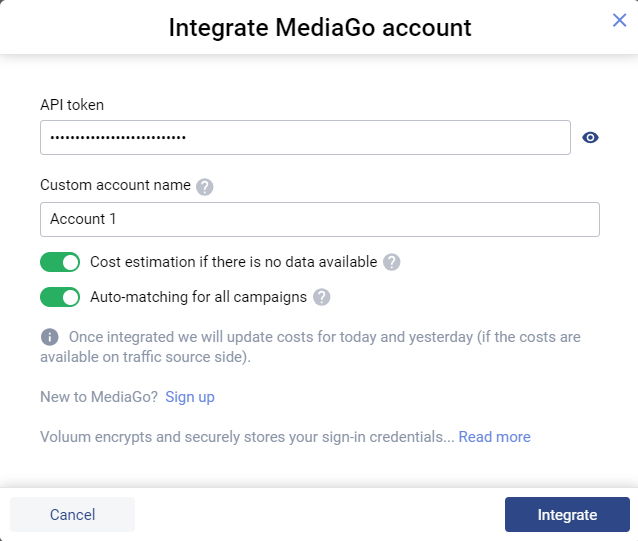
January update: Baidu Global MediaGo integration
MediaGo is Baidu’s advertising division with tons of premium quality placements – that now can be managed from within Voluum. Baidu Global MediaGo is the twentieth Voluum fully integrated platform, with more to come!
To integrate MediaGo with Voluum, you just need to request the API key from MediaGo’s support. Note that the API key needs to be base64 encoded – you can request it in that from.
Once you have it, go to Voluum Automizer and click Add integration. Then select MediaGo from the list of integrated platforms.

Provide your API key and you are all set!
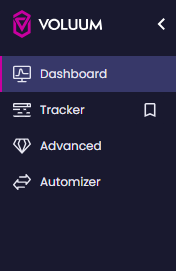
December Update: Side navigation is finally here!
The biggest redesign of the Voluum interface is finally here in the form of side navigation. This new Voluum look clearly separates its functions into easily reachable modules to facilitate various working styles and lay groundwork for future updates.
Note that side navigation will be released in batches to various groups of clients. There’s no action needed from your side: Voluum will automatically enable side navigation on your account once it is available for you.
The modules, available on the left-hand side menu, are as follows:
- Dashboard: Provides a quick overview of your campaigns
- Tracker: Shows the standard tracker view where you can create new campaigns or analyze reports
- Advanced: Host features previously found in the Settings menu:
- Conversion upload
- Custom conversions
- Integrations
- Shared Reports
- Traffic fitlering
- Anti-Fraud Kit
- MTTC
- Lander Protection Script
- Redirect Webhook
- Automizer: Enables access to the Automizer module, where you can integrate traffic sources and create auto-rules
In the button-left corner, you can find additional modules:
- Notifications
- Chat
- Support
- Error log
- Account settings
- Workspace selector
- Settings

More details can be found in the Migrating to side navigation article.
November update: CloudFront is here to take over handling of tracking domains
CloudFront is a CDN run by Amazon. Voluum team has decided to use it to take over handling of tracking domains, which was previously governed by an in-house solution. CloudFront introduces a more robust and secure environment that protects privacy, shortens the distance between content and clients, and provides scalability. Read more about CloudFront and Voluum in our blog post.
The only change for users is the slightly different custom domain setup. No existing dedicated domains will be removed.
Note that the rollout of this feature is gradual.
If your setup looks like this then you have CloudFront enabled on your account.
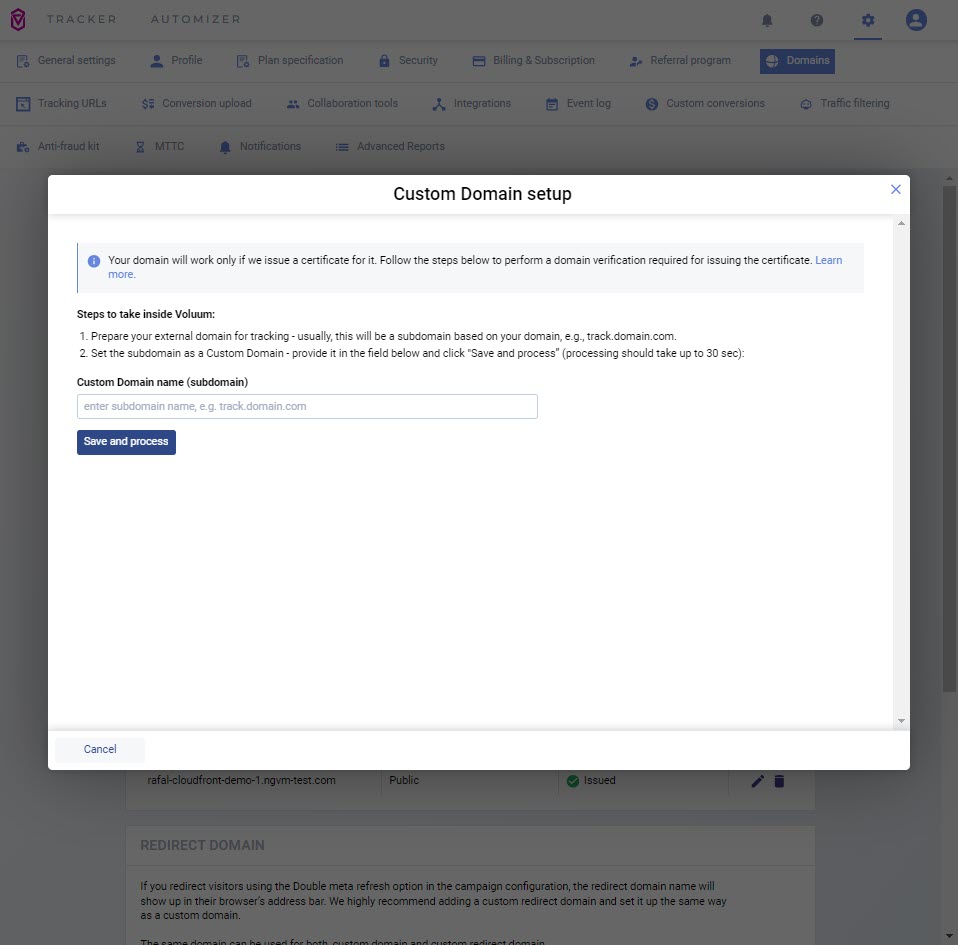
When adding a custom domain, you will have to create two CNAME records in your domain provider. Read the documentation to learn more.
October update: Tracking domain report & more domain-related features!
Do you have multiple tracking domains and were you looking for a good way to see which campaign uses which domain?
Now you can, with ease! Voluum’s recent feature update adds a new report type: tracking domain reports. It is available in the context of campaigns.
Expanding on domain-related features, you can now get an email from Voluum when your domain is marked as suspicious, malicious, or a threat by Google Web Risk or Virus Total. Plus, there are updates to Voluum Mobile app and as usual, several quality-of-life updates.
To view the tracking domain report, Click More Reports / Tracking domain.

Note that in this report, you can only group by Campaigns.

September update: Offer cap & group by vertical
September was a month of quality-of-life updates for us. Firstly, we fixed offer cap configuration, which could cause problems when moving offers between workspaces. Secondly, we introduced an option to group offers by market vertical – especially useful when you advertise in different industries.
There were also many changes under the hood and preparations for a big reveal in the coming months – stay tuned!
August update: Kelkoo integration is live!
Kelkoo is an e-commerce marketing platform for online retailers and publishers alike. The recent integration with Voluum allows users to pass conversion data from Kelkoo to Voluum using reliable API connection.
Additionally, there are plenty of under the hood and quality of life improvements that aim to make using Voluum even better!
The integration is available in Voluum settings. Navigate there and go to the ‘Integrations’ tab. Click ‘Add integration’, select Kelkoo and provide the API key that you can get from Kelkoo Publisher Center.
July update: Did someone say Shopify integration?
July brought one major update, apart from several quality-of-life ones. The big update s the integration with Shopify, a beloved ecommerce platform. This is a great opportunity for ecommerce marketers that were using or considering using paid advertising.
The integration allows to track ‘purchase’ and ‘add to cart’ events, which allows marketers to connect all their paid and organic advertising efforts in one platform – Voluum.
To make integration work, you need to install Voluum from Shopify app store and then provide your tracking domain and offer IDs.

Once you do so, create custom conversions for ‘Purchase’ and ‘AddToCart’ events in Voluum.
Get Voluum – the constantly updated ad tracker!
 Facebook
 Telegram