
Meta Conversions API for Media Buyers: Setup With a Tracker (2026)

If you run Meta ads to affiliate offers, there’s a fair chance Meta has never seen most of your conversions. The sale happens on a network’s or an operator’s page, your pixel isn’t there, and Ads Manager is left optimizing toward people who click rather than people who convert.
The Meta Conversions API closes that gap. It sends conversions to Meta from a server instead of a browser, so they reach Meta even when the pixel can’t fire, is blocked or was never installed on the page where the sale happened.
This guide covers what the Meta Conversions API (CAPI) is, how it differs from the pixel, why affiliates in particular need it, how to set it up through a tracker like Voluum, how deduplication works and what to check to keep your Event Match Quality high.
What Is the Meta Conversions API?
The Meta Conversions API is a server-side connection that sends conversion events, such as leads, purchases or registrations, directly from your server or tracker to Meta. A conversion API in general is any server-to-server link between your data and an ad platform. Meta’s version is the best known, which is why media buyers often just call it CAPI or Facebook CAPI.
Meta treats it as a partner to the pixel, not a replacement. In its own implementation guide, Meta recommends building CAPI as an extension of an existing pixel setup and sending the same event from both, so it can fill in what the browser missed.
Why does that matter so much? Because Meta’s delivery system learns from conversions. Every conversion it never sees is a lesson it never learns, and your campaigns end up optimizing toward an incomplete picture of who actually buys.
Meta Pixel vs. Meta Conversions API
| Meta Pixel | Conversions API | |
|---|---|---|
| Where it runs | In the visitor’s browser | On a server or tracker |
| Blocked by ad blockers and privacy settings | Often | No |
| Works when the conversion happens on someone else’s page | No, you need code on that page | Yes, through a postback to your tracker |
| Setup | Paste a code snippet | Integration or partner tool |
| Best used | Together with CAPI, deduplicated | Together with the pixel, or on its own when there’s no page to put the pixel on |
If you’ve read our guide to the tracking pixel and postback URL, this will feel familiar. CAPI is the same server-side idea as a postback, pointed at Meta instead of at your tracker.
Do Affiliates Really Need CAPI?
Ask an e-commerce brand and they’ll say CAPI is a nice upgrade. Ask an affiliate and it’s closer to essential.
Here’s the problem. When you run Meta ads to an affiliate offer, the conversion happens on the network’s or the operator’s page. You can’t install your pixel there. So unless the conversion travels back to Meta another way, Meta sees clicks and nothing after them, and its algorithm optimizes for people who click, not people who convert.
The fix is a relay. The network reports the conversion to your tracker with a postback, and the tracker sends it on through the Meta Conversions API, along with the Facebook click ID from the original visit. Meta gets a real conversion, matched to a real ad click, without a single line of code on the offer page.
Meta is one of several walled gardens with this problem; our guide to tracking walled gardens compares it with TikTok and Telegram. The same logic applies to iGaming, where registrations and first-time deposits happen on the operator’s site, and to TikTok, which uses its own Events API in the same way. Our TikTok ads tracking guide covers that side.
How to Set Up the Meta Conversions API With Voluum
Voluum’s Facebook integration handles the relay for you. Here’s the setup, based on our step-by-step Facebook conversions guide, which has the full detail:
1. Verify Your Domain in Meta
In Meta Business Manager, verify the domain your visitors land on by adding the DNS text record Meta gives you. This is the domain you’ll later enter as the event source URL.
2. Get Your Pixel ID and Access Token
In Events Manager, select your pixel, which Meta now calls a dataset, and copy its ID. Then open the Settings tab and, under Conversions API, click Generate access token. Copy it right away and keep it somewhere safe.
3. Add the Facebook Integration in Automizer
In Voluum, open Automizer, go to Traffic sources, click Add traffic source and choose Facebook. Connect your Facebook account to sync ad spend, then enter the pixel ID, the access token (shown as Conversion API key) and your verified domain as the event source URL.
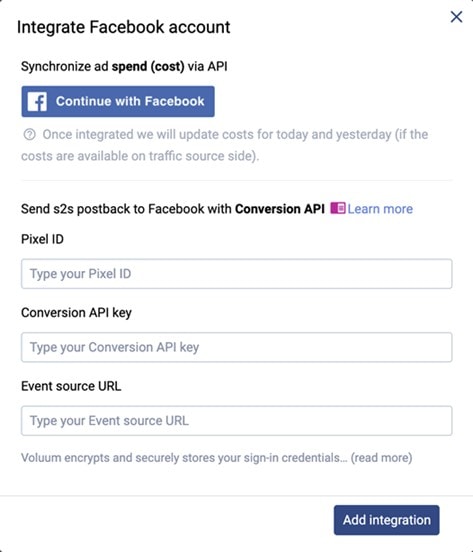
4. Generate the Postback and Add It to the Traffic Source
Click Generate next to the Facebook integration and choose the event this postback should report, such as Lead or Purchase. Then edit your Facebook traffic source in Voluum: map fbclid to the External ID, so the click ID Meta appends to every ad click is stored with the visit, turn on the traffic source postback URL and paste the generated URL.
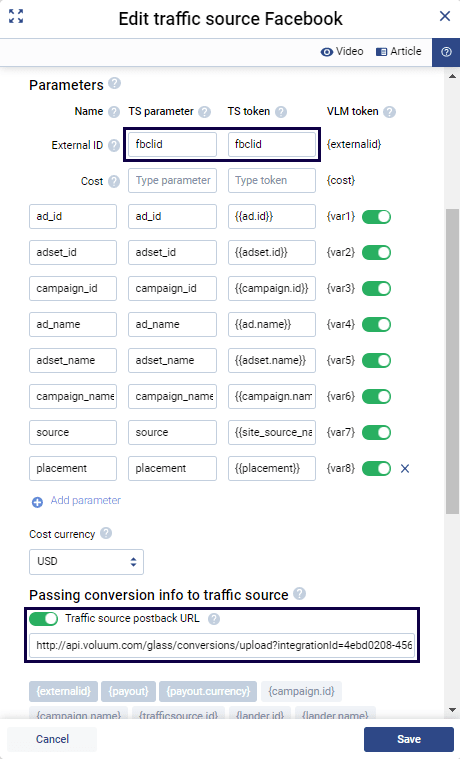
While you’re there, pass Meta’s dynamic parameters so you can break reports down by ad, ad set and campaign:
| Voluum parameter | Meta macro | What it passes |
|---|---|---|
| ad_id | {{ad.id}} | Ad ID |
| adset_id | {{adset.id}} | Ad set ID |
| campaign_id | {{campaign.id}} | Campaign ID |
| ad_name | {{ad.name}} | Ad name |
| adset_name | {{adset.name}} | Ad set name |
| campaign_name | {{campaign.name}} | Campaign name |
| placement | {{placement}} | Placement, such as Feed or Stories |
Don’t add fbclid as a macro in your ad URL. Meta appends it to the landing page URL on its own, and declaring it yourself can overwrite the real value with an empty one.
5. Test One Conversion
Click your own ad, trigger a test conversion and check three places: the visit in Voluum, the conversion in Voluum and the event in Meta’s Events Manager, where Test Events shows server events as they arrive. If the event shows up in Voluum but not in Meta, the postback URL or the fbclid mapping is the usual suspect.
Deduplication: One Conversion, Counted Once
If you run the pixel and CAPI side by side for the same event, Meta receives two copies of every conversion. That’s intended. It only becomes a problem when Meta can’t tell they’re copies.
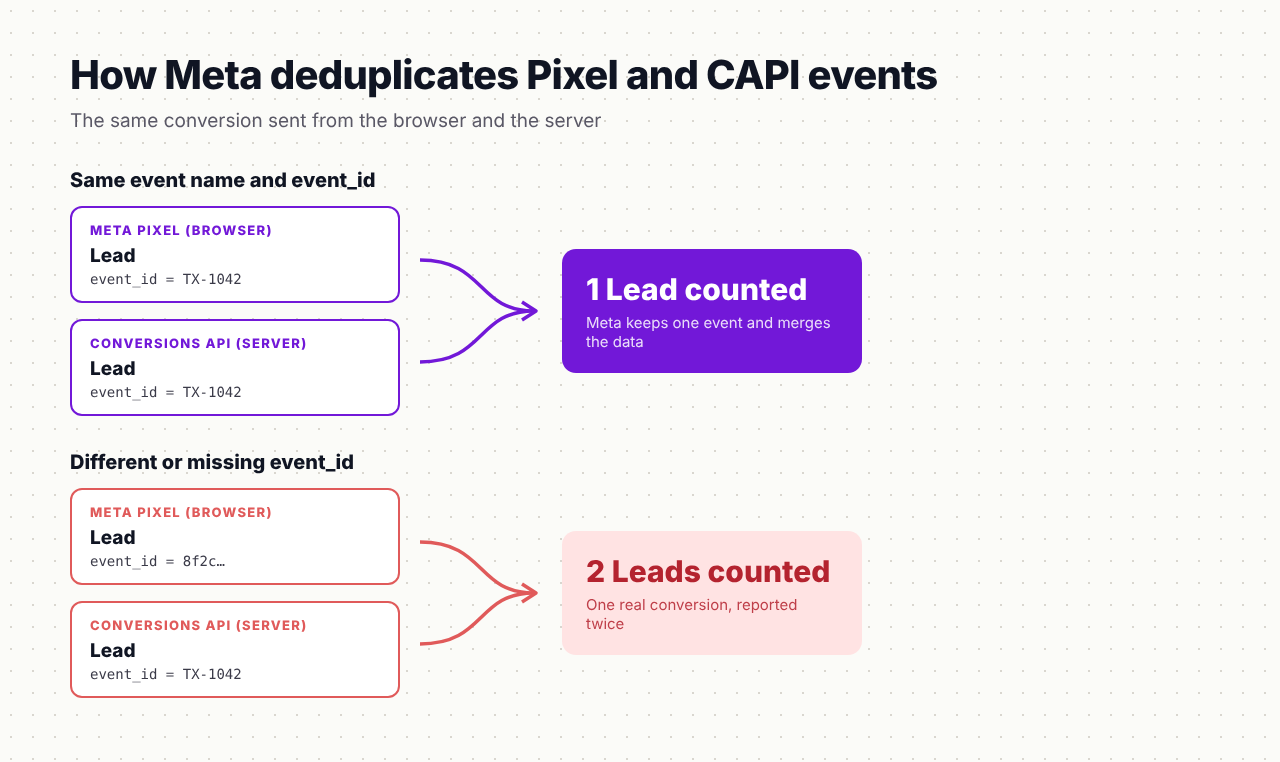
Meta’s rule is to send the same event_name and event_id from both the pixel and the server. When both match, Meta keeps one event and combines the data. When the event_id differs or is missing, one real conversion turns into two, and your CPA looks twice as good as it is.
The simplest source for an event_id is something that already identifies the conversion, such as an order or transaction ID. And if your conversions only happen on an affiliate offer page, there’s no pixel event on that page to collide with, so the CAPI route through your tracker is enough on its own.
Beyond Meta: The Same Idea on Google and TikTok
The Meta Conversions API isn’t the only server-side route worth setting up. Google takes conversions through offline imports tied to the GCLID and through enhanced conversions. Voluum’s enhanced Google integration sends conversions through Google’s Data Manager with SHA-256 hashed match keys, so Smart Bidding sees conversions that browser restrictions would otherwise hide. TikTok works the same way through its Events API.
Each platform still applies its own attribution window and its own attribution model to the conversions you send, so expect their numbers to differ from your tracker’s. That’s normal, and it’s why your tracker stays the source of truth for comparing sources against each other.
Event Match Quality Checklist
Event Match Quality is Meta’s score from 0 to 10 for how well the customer information in your events can be matched to Meta accounts. Higher scores mean more conversions attributed to ads and better optimization. Before you call your setup done, run through this list:
- fbclid is captured on every click. In Voluum, it’s mapped to the External ID, so the click ID can travel back with the conversion as the fbc parameter.
- Events arrive quickly. Send conversions as soon as they happen. Delayed events are less useful for optimization, and very old ones are rejected.
- The event matches the optimization goal. The event you send through CAPI should be the one your ad set optimizes for, such as Lead or Purchase.
- Pixel and server events share an event_id wherever both fire for the same conversion.
- Customer data is hashed where required. Email, phone and name must be hashed with SHA-256 before sending, while IP address, user agent, fbp and fbc must stay in plain text or matching breaks.
- Send more identifiers when you have them. On your own lead forms or checkout, adding a hashed email or phone number is one of the strongest ways to raise the score.
- Check the score per event. Events Manager shows Event Match Quality for each event type, so review your main conversion event first.
Once conversions flow reliably to Meta, judge the results in your tracker with the same affiliate marketing KPIs you use everywhere else. And if you’re still choosing a tool, our comparison of Facebook ad tracking software looks at how ten trackers handle CAPI.
Send Meta the Conversions It’s Missing
Voluum records every conversion from any offer with S2S postbacks, keeps the fbclid with each click and passes conversions to Meta through the Conversions API, while tracking every other traffic source in the same report. Compare Voluum plans and connect Meta in an afternoon.
Frequently Asked Questions
What is the Meta Conversions API?
The Meta Conversions API is a server-side way to send conversion events, such as leads and purchases, directly to Meta from your server or tracker. Because it doesn’t depend on the visitor’s browser, it reports conversions that ad blockers or privacy settings hide from the pixel, and conversions that happen on pages where the pixel can’t be installed.
What is the difference between the Meta Pixel and the Conversions API?
The Meta Pixel is code that runs in the visitor’s browser and reports events from your own pages. The Conversions API sends events from a server. Meta recommends using both together, sending the same events with matching event names and event IDs so it can combine and deduplicate them.
Do I need a developer to set up Facebook CAPI?
Not necessarily. A direct integration requires development work, but partner tools and trackers handle it without code. In Voluum, you enter your pixel ID, access token and verified domain in the Facebook integration, generate a postback for your event and add it to the Facebook traffic source.
How does Meta deduplicate Pixel and Conversions API events?
Meta deduplicates events that share the same event name and event ID. If the pixel and the Conversions API both send a Lead with the same event ID, Meta counts one Lead. If the IDs differ or are missing, the conversion is counted twice, which inflates results.
What is a good Event Match Quality score?
Event Match Quality runs from 0 to 10, and higher is better. The score depends on which customer information parameters you send and how often they match a Meta account. Sending the fbc click identifier, IP address and user agent with every event, plus hashed email or phone where available, usually raises it.



 Facebook
 Telegram


