
Tracking in Walled Gardens: Meta, TikTok and Telegram Traffic

Meta will happily tell you how many conversions your ads drove. So will TikTok. Telegram will tell you how many people saw your ad, and not much else. Three platforms, three very different ideas of what an advertiser deserves to know.
That’s what tracking walled gardens looks like in practice. Each platform keeps its users, its data and its measurement inside its own walls, and shares only what it chooses. This guide explains what Meta, TikTok and Telegram each hide, how in-app browsers complicate things, which tracking method fits each platform and how to set up one consistent view across all three with a tracker.
What Is a Walled Garden in Advertising?
A walled garden is an ad platform that controls the whole environment: the audience, the ad delivery, the data and the reporting. You buy media inside it, and it decides how much of what happens next you get to see.
Meta, TikTok and Telegram all qualify, though in different ways. Meta and TikTok share a lot of data with advertisers but model and attribute it by their own rules. Telegram’s official ad platform shares very little. In every case, the platform reporting your results is also the one selling you the clicks, which is why media buyers keep an independent record in a tracker.
What Each Platform Hides
Meta (Facebook and Instagram)
Meta adds a click ID, fbclid, to every ad click, so a tracker can capture it and send conversions back. What Meta keeps to itself is how it counts. Its default setting credits conversions within 7 days of a click and also within a day of a view or an engagement, and it fills gaps with modeled conversions. Your tracker, which only sees real clicks, will rarely match Ads Manager exactly.
Then there’s the browser. Links in Facebook and Instagram usually open in Meta’s in-app browser, which keeps its own cookies, separate from Safari or Chrome.
TikTok
TikTok works much like Meta. It appends a ttclid to ad clicks, offers a pixel and a server-side Events API, and attributes conversions within its own windows, 7-day click and 1-day view by default for web campaigns. Links open in TikTok’s in-app browser, and the platform’s reporting covers only what happens inside TikTok’s view of the funnel.
Telegram
Telegram is the most closed of the three. Its official Telegram Ads platform sells sponsored messages of up to 160 characters with one button, shown in large public channels, bots and search. There is no click ID passed to your link. Reporting is mostly views and spend, plus joins or bot starts when the ad points to a Telegram destination.
What you can track also depends on the account type. According to Telegram Ads partners, Euro-funded accounts can link to external websites and use the Telegram Pixel, while TON-funded accounts point to Telegram channels and bots and come with no pixel or event data.
The In-App Browser Problem
All three platforms open links in their own in-app browsers by default on mobile. For tracking, that creates one specific problem.
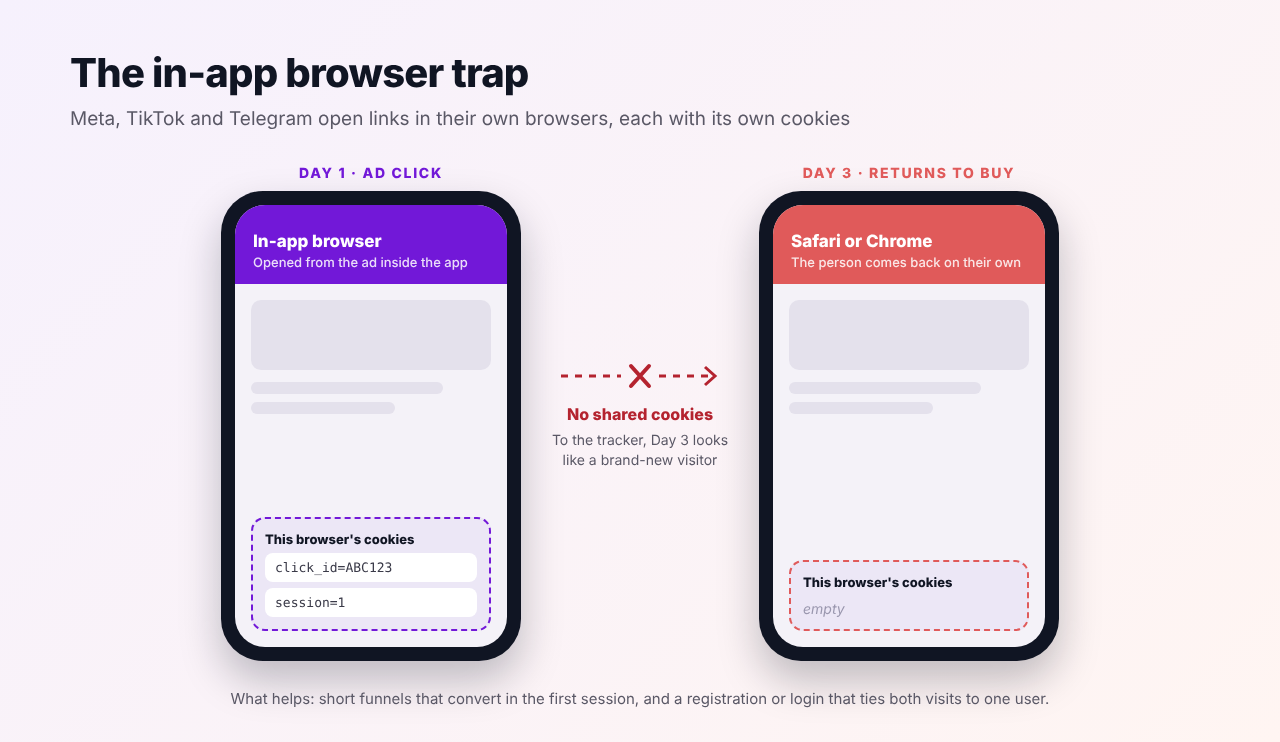
If a person clicks your ad, browses in the in-app browser and buys right away, everything works. If they close the app and come back later in Safari or Chrome, that browser has none of the cookies from the first visit. To any cookie-based system, the return visit is a new person, and the conversion lands as organic or direct.
A click ID in the URL doesn’t solve this either, because the person doesn’t return through your tracking link. What helps is designing around it: short funnels that convert in the first session, and a registration or login on the first visit that ties both sessions to one user on the advertiser’s side.
Which Tracking Method Fits Each Platform?
Here’s how the options line up. The pattern is clear: wherever a platform passes a click ID, server-side tracking does the heavy lifting, and where it doesn’t, your own link structure has to.
| Meta | TikTok | Telegram Ads | |
|---|---|---|---|
| Click ID on ad clicks | fbclid | ttclid | None |
| Browser pixel | Meta Pixel | TikTok Pixel | Telegram Pixel, Euro accounts only |
| Server-side route to the platform | Conversions API | Events API | None |
| Tracker route | S2S postback from the network, then CAPI | S2S postback from the network, then Events API | Parameters in the destination URL, S2S postback from the network |
| Platform attribution defaults | 7-day click, 1-day view and engage-through | 7-day click, 1-day view | Views and on-platform actions only |
| Recommended setup | Tracker plus CAPI, pixel on your own pages | Tracker plus Events API, pixel on your own pages | Tracker with a unique link per ad, Telegram Pixel where available |
A General Setup That Works Across All Three
The details differ, but the backbone is the same for every walled garden. Your tracker sits between the platform and the offer and keeps the record that each platform can’t see on its own.
- Send every ad click through a tracking link. The tracker records the visit and creates its own click ID, whatever the platform passes or doesn’t.
- Capture the platform’s click ID where there is one. Map fbclid or ttclid to the external ID, so conversions can later be matched inside Meta or TikTok.
- Get conversions back by postback. The affiliate network or operator reports each conversion to the tracker with an S2S postback, so the browser never matters.
- Return conversions to the platform. On Meta and TikTok, the tracker forwards them through the Conversions API or Events API, so the platform’s bidding learns from real results.
- Compare everything in one place. Judge all three platforms on the same KPIs and the same attribution rules in your tracker, not in three different dashboards.
Meta
Set up the Facebook integration in your tracker with your pixel ID and Conversions API token, map fbclid to the external ID and add the generated postback to the traffic source. Our guide to the Meta Conversions API for media buyers walks through it step by step, and our comparison of Facebook ad tracking software shows how other tools handle it.
TikTok
Use the TikTok traffic source template, which captures the ttclid, connect TikTok in your tracker’s integrations and add the generated postback that feeds the Events API. The full walkthrough, including TikTok’s macros and deduplication, is in our TikTok ads tracking guide.
Telegram
Because Telegram passes no click ID, the link has to carry the information. Point each sponsored message to your tracking link with fixed parameters that identify the campaign and the ad, since Telegram doesn’t add any tags on its own. Use a separate link per ad and per channel group you target, so performance can be split in your reports. Conversions then come back by postback from the network as usual. Our guide to tracking Telegram Ads, Mini App ads and bot traffic covers the full setup, including bot start parameters and Mini App ad networks.
For ads that send people into a bot or a Telegram Mini App rather than a website, the bot’s start parameter plays the same role as a URL parameter. If you’re exploring that format, our guest post on launching iGaming offers in Telegram Mini Apps covers the creative side. And once conversions flow, you can even get conversion alerts in Telegram through n8n.
Comparing Walled Gardens Fairly
Each platform grades its own homework. Meta and TikTok count view-throughs and modeled conversions, and Telegram counts almost nothing beyond views. Put their dashboards side by side and you’re comparing three different rulebooks.
A tracker gives you one rulebook. Every source is measured by the same attribution model and the same attribution window, with conversions counted only when the network confirms them. Use the platforms’ own numbers to understand how their algorithms see your campaigns, and your tracker’s numbers to decide where the budget goes.
The walls are also getting more complicated, not less. AI agents now browse inside some of these apps and browsers, which raises its own questions, covered in our article on AI browsers and affiliate tracking.
One View Across Every Walled Garden
Voluum tracks Meta, TikTok and Telegram traffic in the same reports, keeps each platform’s click ID with the visit, records conversions by S2S postback and sends them back through each platform’s server-side API where one exists. See how Voluum works.
Frequently Asked Questions
What is a walled garden in advertising?
A walled garden is an advertising platform that controls its audience, ad delivery, data and reporting, and shares only part of it with advertisers. Meta, TikTok, Google and Telegram are common examples. Because the platform also reports on its own performance, advertisers use independent trackers to verify results.
How do you track conversions from Meta and TikTok ads?
Send each ad click through a tracker, capture the platform’s click ID (fbclid for Meta, ttclid for TikTok), receive conversions from the affiliate network by S2S postback and send them back to the platform through Meta’s Conversions API or TikTok’s Events API. Add the pixel on your own pages and deduplicate it with matching event IDs.
Can you track Telegram Ads conversions?
Yes, but not through a click ID, because Telegram doesn’t pass one. Use a unique tracking link with fixed parameters for each ad, and record conversions by postback from the network. Euro-funded Telegram Ads accounts can also use the Telegram Pixel for website conversions, while TON-funded accounts get no pixel or event data.
Why don’t my Meta and TikTok numbers match my tracker?
The platforms count view-through and engagement conversions, use their own attribution windows and add modeled conversions, while a tracker counts conversions confirmed for real clicks. In-app browsers also split visits across separate cookie stores. Small gaps are normal; compare on the same window and click-through basis.
What is an in-app browser and why does it affect tracking?
An in-app browser is the built-in browser Meta, TikTok, Telegram and other apps use to open links. It keeps its own cookies, separate from Safari or Chrome, so a person who clicks an ad and returns later in their regular browser looks like a new visitor to cookie-based tracking.


 Facebook
 Telegram


