
Server-Side Tracking for Media Buyers: S2S vs Pixel vs CAPI

A cookie set by JavaScript in Safari survives 24 hours if the visitor arrived from an ad link, and 7 days otherwise. If your conversion tracking depends on a browser remembering something until the sale happens, that’s the window you’re working with on every iPhone.
Server-side tracking takes the browser out of that job. Instead of a script in the visitor’s browser reporting the conversion, one server reports it directly to another. For media buyers, it’s the difference between hoping an event arrives and knowing it will.
This guide explains what server-side tracking is, why browser pixels keep losing data, how pixels, S2S postbacks and Conversions APIs compare, and a practical implementation path in Voluum.
What Is Server-Side Tracking?
Server-side tracking is any setup where conversion or event data is sent from a server rather than from the visitor’s browser. Client-side tracking is the opposite: a pixel or script runs on the page and reports the event from the browser.
The difference matters because the browser is a hostile place for tracking now. It belongs to the visitor, and the visitor, the browser vendor and any extensions all get a say in what it sends. A server belongs to you or your partner, and it sends what it’s told to send.
Why Browser Pixels Lose Data
No single cause explains the gap between what happened and what a pixel reports. It’s death by a thousand cuts:
- Cookie limits. Safari’s Intelligent Tracking Prevention caps script-set cookies at 7 days, or 24 hours after an ad click, so a buyer who returns later looks like a stranger.
- Stripped click IDs. Safari’s Link Tracking Protection removes known identifiers such as gclid and fbclid in Private Browsing and in links from Mail and Messages, and in regular tabs when users opt in. Apple doesn’t publish the full list of parameters it targets.
- Ad blockers. Many block third-party tracking scripts along with ads, and some browsers now ship with one built in.
- In-app browsers. Meta, TikTok and Telegram open links in their own browsers with separate cookies, as our guide to tracking walled gardens explains.
- AI agents. Agentic browsers and cloud agents add new edge cases, covered in our article on AI browsers and affiliate tracking.
- Pages you don’t control. For affiliates, the biggest one of all. The conversion happens on the network’s or operator’s page, where your pixel was never allowed in the first place.
Each cut is small. Together, they’re why pixel-only setups routinely under-report, and why the platforms themselves now push server-side alternatives.
Three Ways to Report a Conversion
A conversion can reach your tracker or an ad platform in three ways. Only the first depends on the browser:
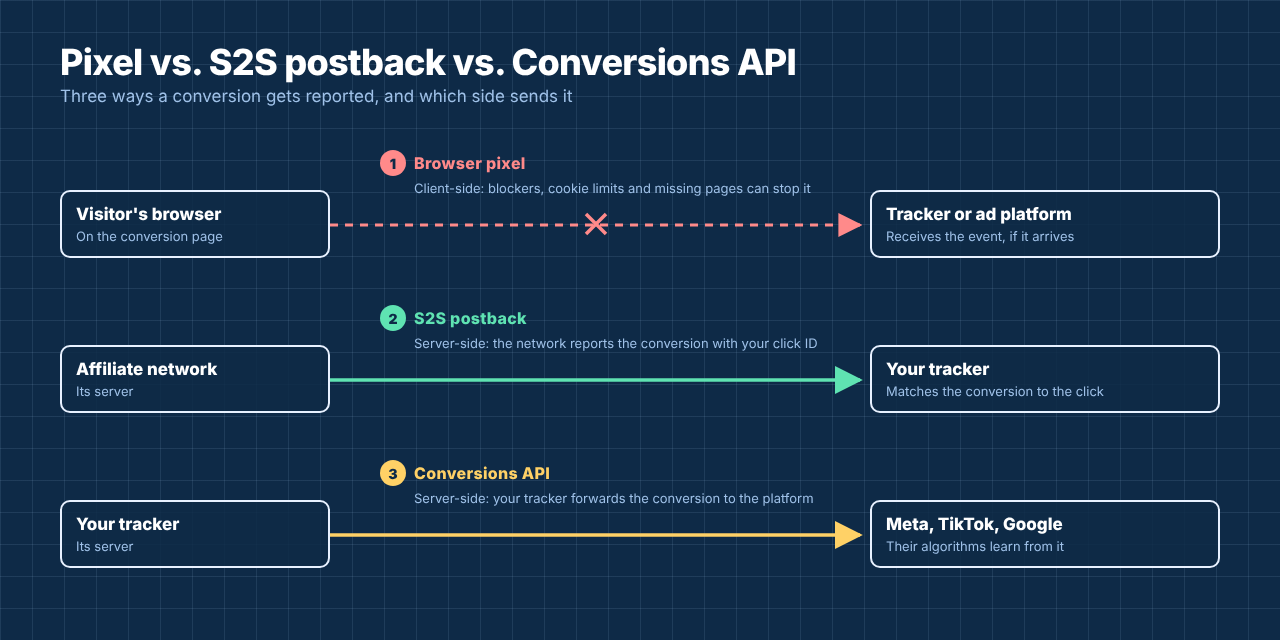
1. The browser pixel fires on the conversion page and reports the event from the visitor’s browser. It’s quick to install, but every limit described above applies to it, and it only works on pages where you’re allowed to add code.
2. The S2S postback reports a conversion from an affiliate network or operator to your tracker. This is the core of affiliate tracking: the tracker passes its click ID to the offer, and the network returns it in a server call when the visitor converts. Our postback URL glossary entry covers the mechanics.
3. The Conversions API sends conversions from your tracker or server to an ad platform, so its bidding learns from them. Meta’s Conversions API, TikTok’s Events API and Google’s offline and enhanced conversions all work this way.
You may also hear about server-side tagging, where an advertiser moves its own site tags to a server container such as server-side Google Tag Manager. It follows the same principle and suits brands with their own checkout, but it’s rarely relevant for affiliates, who don’t own the conversion page.
S2S vs. Pixel vs. CAPI: Pros and Cons
| S2S postback | Browser pixel | Conversions API | |
|---|---|---|---|
| Direction | Network to tracker | Browser to tracker or platform | Tracker or server to ad platform |
| Needs code on the conversion page | No | Yes | No |
| Affected by ad blockers and cookie limits | No | Yes | No |
| Works for affiliate offers | Yes, the standard method | Only if the network allows your pixel | Yes, fed by your postbacks |
| Setup effort | Low: one URL with tokens | Low: paste a snippet | Medium: integration or partner tool |
| Main weakness | Depends on the network passing the click ID back | Loses events to the browser | Matching quality depends on the identifiers you send |
| Best used for | Every affiliate conversion | On-site events on pages you own | Feeding platform algorithms with real conversions |
The pattern is clear. S2S and CAPI are complementary, not competing. One gets the conversion to your tracker, the other gets it from your tracker to the platform. The pixel stays useful where you own the page, as long as it’s deduplicated with the server events. Our older comparison of the tracking pixel and postback URL goes deeper into the first two.
Server-Side vs. Client-Side: When You Still Need the Browser
Server-side isn’t a magic replacement for everything that happens in a browser. A few things still need it.
Your tracker has to see the visit itself, and that happens in the browser, either through a redirect or a tracking script on your lander. On-page behavior, such as scroll depth or a button click before the conversion, only exists client-side. And retargeting audiences on ad platforms are still built largely from pixel events on your own pages.
So the realistic goal isn’t to remove the browser from tracking. It’s to stop relying on it for the one thing that pays: the conversion. Record the visit in the browser, record the conversion on the server, and use pixels as a supplement where you control the page.
Implementing Server-Side Tracking in Voluum
Here’s the path, from the basics to the full loop. Each step links to the detailed guide rather than repeating it:
- Send traffic through a Voluum campaign URL. Voluum records the visit and creates its own click ID, which is the anchor for everything server-side that follows.
- Pass the click ID to the offer. Add Voluum’s {clickid} token to the offer URL in the parameter the network expects, such as sub1 or aff_sub.
- Set up the postback. Give the network your postback URL with its own click ID token in cid, plus payout and, for repeat conversions, a transaction ID. Voluum’s postback parameters explain each field.
- Capture the platform’s click ID. For Meta, TikTok and other networks, map their click ID to the external ID, so conversions can be matched back on their side.
- Close the loop. Send conversions back with a traffic source postback or Automizer’s integrations, which feed Meta’s Conversions API and TikTok’s Events API. For Google, pass conversions tied to the GCLID, and keep Google’s tracking-template rules in mind, covered in our piece on Google’s 2026 gambling ad rules.
- Test one conversion end to end. Check the visit, the conversion in Voluum and the event on the platform. If any link breaks, our list of the most common tracking issues shows where to look.
Expect some differences between Voluum and each platform even when everything works. Platforms add view-through and modeled conversions within their own attribution windows, while a server-side setup counts what was actually confirmed.
Stop Letting the Browser Decide What You Can See
Voluum records every visit, takes conversions by S2S postback from any network and sends them on to Meta, TikTok and other platforms through server-side integrations, so the numbers you optimize on don’t depend on what a browser allowed. Compare Voluum plans.
Frequently Asked Questions
What is server-side tracking?
Server-side tracking sends conversion and event data from a server instead of the visitor’s browser. Common forms are S2S postbacks from affiliate networks to trackers, Conversions APIs from trackers or servers to ad platforms, and server-side tagging through a server container. Because the browser isn’t involved, ad blockers and cookie limits don’t affect it.
What is the difference between server-side and client-side tracking?
Client-side tracking runs in the visitor’s browser, usually as a pixel or script on the page, so it depends on what the browser allows. Server-side tracking sends the data from one server to another. Most setups combine both: the visit is recorded in the browser, and the conversion is reported server-side.
What is S2S tracking?
S2S, or server-to-server, tracking is the affiliate form of server-side tracking. The tracker passes a click ID to the offer, the affiliate network stores it, and when the visitor converts, the network’s server calls the tracker’s postback URL with that click ID, so the conversion is credited to the right click.
Is server-side tracking better than a pixel?
For conversions, usually yes, because it isn’t affected by ad blockers, cookie limits, in-app browsers or pages you can’t add code to. Pixels are still useful for on-page events and retargeting on pages you own. When you use both for the same conversion, deduplicate them so it’s only counted once.
Does Safari block server-side tracking?
No. Safari’s privacy features act in the browser: Intelligent Tracking Prevention limits cookie lifetimes, and Link Tracking Protection strips known click IDs in some browsing modes. A server-to-server call isn’t affected, although the visit must still reach your tracker with a click ID for the conversion to be matched.



 Facebook
 Telegram


