
Prelanders and Multi-Step Landers: Advanced Setups, Including the Secondary Campaign Method

Cold traffic rarely buys on the first page it sees. Someone scrolling a news site or a push notification wasn’t looking for your offer a second ago, and sending them straight to a sales page asks for a decision they aren’t ready to make.
A prelander, or pre-landing page, sits between the ad and the offer to close that gap. It’s a short page, often an advertorial, quiz or review, that warms the visitor up, explains why the offer matters and sends only interested people onward. A multi-step lander takes the same idea further, with two or more steps before the offer. This guide covers both, from simple flows to advanced setups in Voluum, including the secondary campaign method, plus how to A/B test them properly.
What Is a Prelander?
A prelander is a page placed before the main landing page or offer. It isn’t there to sell; it’s there to prepare. A good one does three things: it matches the promise of the ad, so the click feels worth it; it gives the visitor a reason to care, through a story, a question or a comparison; and it filters, so the people who click through to the offer actually want it.
In a tracker, the flow looks like this: ad, then prelander, then lander or offer. Each step has its own click-through rate, so you can see exactly where people drop off instead of guessing.
Common Prelander Types
- Advertorial. An article-style page that tells a story or explains a problem, then points to the offer as the solution. Common on native traffic, covered in our native ads toolkit.
- Quiz or survey. A few short questions that make the visitor invest a little effort and segment them at the same time. Often the first step of a multi-step funnel.
- Review or listicle. A comparison of several options, with the offer presented as the best fit for a specific reader. Popular in finance, software and e-commerce.
- Interactive teaser. A spin wheel, scratch card or countdown. Typical of sweepstakes and mobile content, and also the format most likely to draw ad network scrutiny.
- Video prelander. A short video that explains the offer before the click, used where the product needs showing rather than telling.
Headline Examples for Each Prelander Type
The headline decides whether the visitor reads on, so it should continue the ad’s promise, not repeat it. A few examples to adapt, written to stay on the right side of ad network policies:
| Prelander type | Example headlines |
|---|---|
| Advertorial | Why More Homeowners in Texas Are Rethinking Their Energy Bills What I Learned After Comparing 5 Meal Kits for a Month |
| Quiz or survey | Which Credit Card Fits the Way You Spend? Take the 60-Second Quiz Answer 4 Questions to See the Insurance Plans Available in Your Area |
| Review or listicle | 5 VPNs Compared: Which One Is Best for Streaming in 2026? The 3 Budgeting Apps Worth Trying, and Who Each One Is For |
| Interactive teaser | Spin to See Which Welcome Bonus You Qualify For Scratch the Card to Reveal Today’s Discount |
| Video | Watch: How This Smart Thermostat Pays for Itself 2 Minutes That Explain How Solar Leasing Actually Works |
Whatever the format, avoid headlines that promise results the offer can’t guarantee, imitate news outlets or invent urgency. They may lift click-through for a week, then cost you the account.
Multi-Step Landers: When One Page Isn’t Enough
A multi-step lander splits the warm-up into several pages. The classic example is a quiz: question one, question two, then a result page that recommends the offer. Each step asks for a little more commitment, and visitors who finish are far more invested than those who saw a single page.
Multi-step setups make sense when the offer needs qualification, when you want to route different answers to different offers, or when the decision is big enough that one page feels rushed. They’re overkill for impulse offers, where every extra click is another chance to lose the visitor.
In practice, multi-step landers work best for offers where the visitor has to choose, qualify or commit. Insurance, solar, debt relief and other lead gen offers suit them well, because a quiz can collect the details the advertiser needs and pre-qualify the lead. Dating and health offers benefit from a few personal questions that make the result feel tailored. Sweepstakes and surveys use steps to build engagement before the submit page, and iGaming funnels can let players pick sports or casino before landing on the right welcome offer. Simple, low-price e-commerce offers and app installs usually do better with one short page, or none.
Three Ways to Build Multi-Step Funnels in Voluum
In Voluum, you build a multi-step funnel from the same elements you use every day: campaigns, landers, offers, paths and custom variables. There are three standard ways to set one up, and the right one depends on whether you want all data in one campaign, offer rotation or the simplest setup:
| Method | Data in one campaign | Offer rotation | What gets doubled | Difficulty |
|---|---|---|---|---|
| Multi-offer lander | Yes | No | Clicks | Easy |
| Secondary campaign | No, split across two campaigns | Yes | Visits per traffic source | Easy |
| Internal redirection | Yes | Yes | Visits | Advanced |
The Multi-Offer Lander Method
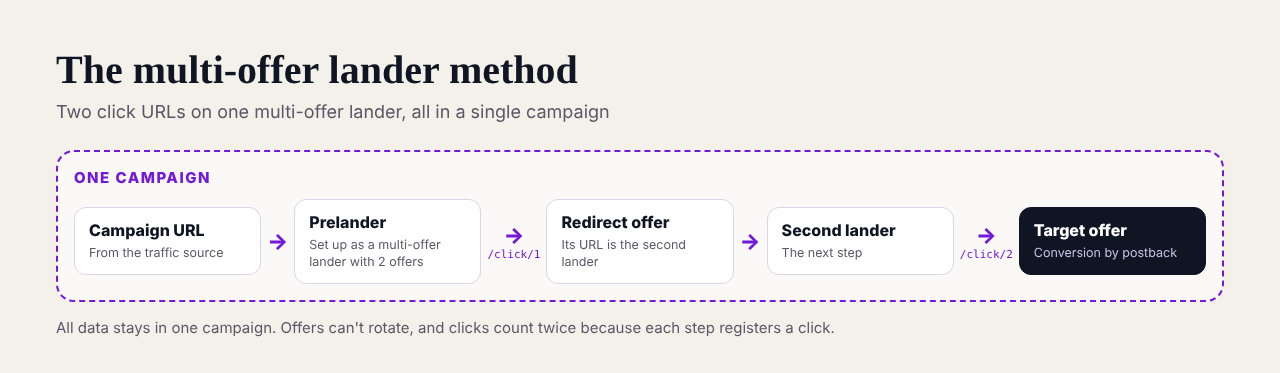
Here, the prelander is set up as a multi-offer lander with two click URLs. Click URL 1 leads to a redirect offer that points to your second lander, which then uses click URL 2 to reach the real offer. Everything stays in one campaign, but you can’t rotate offers, and your click counts double because each step registers a click.
The Secondary Campaign Method
This is the most flexible of the three, and the one this guide focuses on. You create two campaigns. The offer in campaign 1 is simply the campaign URL of campaign 2, so visitors who click through the prelander enter a second campaign that holds the next lander and the target offer.
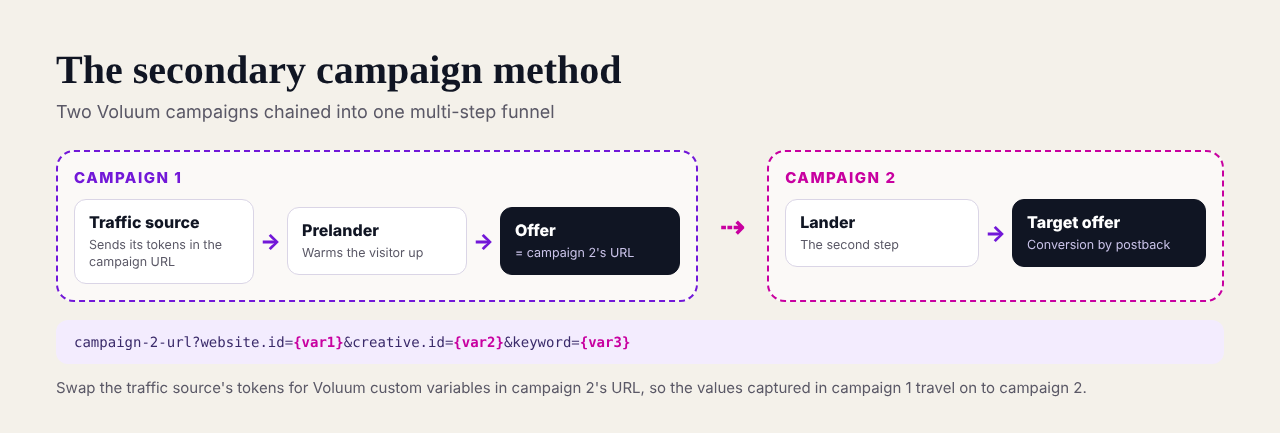
The step that people miss is passing the traffic source’s data along. Campaign 2’s traffic source doesn’t know the original values, so you map them to Voluum custom variables in campaign 1 and pass them on in campaign 2’s URL:
https://your-domain.com/campaign-2-id?website.id={var1}&creative.id={var2}&keyword={var3}In practice: create a traffic source for campaign 2 with its parameters mapped to custom variables, create the second lander, build campaign 2 with that lander and your target offer, then edit its URL so every traffic source token becomes a Voluum custom variable token. Use that edited URL as the offer in campaign 1. Your stats will be split across two campaigns, so analyze them together, and expect visit counts per traffic source to double.
The Internal Redirection Method
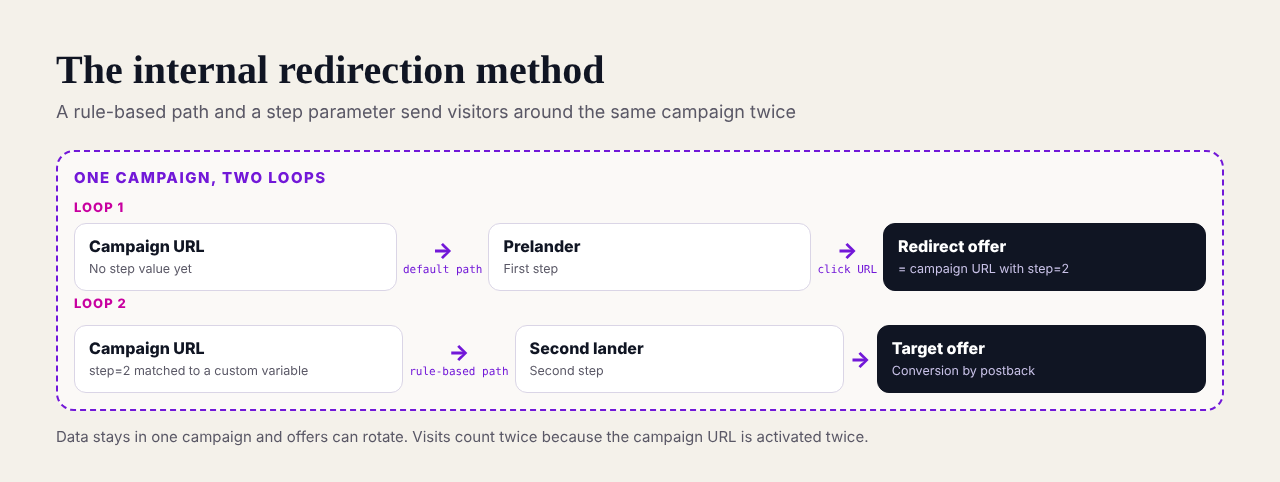
This method keeps everything in one campaign using a rule-based path. The campaign URL sends visitors to the prelander through the default path; the prelander’s click URL comes back to the same campaign with a step parameter set to 2, which triggers a rule that sends them to the second lander and on to the offer. It’s tidy for reporting, but visits are doubled, and it takes more care to set up.
If you control the pages, there’s a fourth option worth knowing: Voluum’s updated direct tracking scripts can track funnels with several landers within a single visit, which suits store pages, sweepstakes and surveys.
How to A/B Test Prelanders
A prelander is only worth keeping if it beats going straight to the offer, so test that first. In Voluum, add a path with no lander next to your prelander path, or rotate several landers in the same path with weights, and let traffic split between them.
- Test one thing at a time. Headline, angle, format or length, but not all at once, or you won’t know what worked.
- Judge on money, not clicks. A page with a lower click-through rate can still win if it sends better visitors. Compare earnings per visit and ROI, along with the other affiliate marketing KPIs.
- Wait for enough conversions. Decide in advance how many conversions each variant needs before you call a winner, and don’t stop a test after a lucky day.
- Automate the boring part. Automated rules can pause a losing lander, and Voluum’s Traffic Distribution AI can shift traffic toward better performers as data comes in.
- Retest after changes. A winning page can stop winning when the season changes, as it often does around Black Friday, or when the traffic source changes.
Prelander Templates to Start From
Three simple structures that work across many verticals:
Advertorial Template
- A headline that mirrors the ad’s promise.
- A short story or problem the reader recognizes.
- What changed, with the offer introduced as the solution.
- Proof: numbers, quotes or a comparison.
- One clear call to action, repeated at the end.
Quiz Template
- A question the reader wants to answer about themselves.
- Two or three more questions that qualify them.
- A short loading or analysis step.
- A result page that recommends the offer that matches their answers.
Review Template
- A promise of an honest comparison.
- Three to five options with clear pros and cons.
- A verdict that recommends the offer for a specific type of reader.
- A summary table and a call to action.
Whatever the template, keep it honest. Ad networks increasingly reject fake news layouts, invented testimonials and fake countdowns, and policies such as Google’s misrepresentation rules spell out why, and a page that gets your account banned is the most expensive one you’ll ever run. If you need a tool to build them, our roundup of landing page builders for affiliate marketing is a good starting point.
Track Every Step of the Funnel
Voluum tracks each step of your funnel, from the ad click through every pre-landing page to the offer, with its own click-through rate, so you know exactly which step earns its place. Conversions arrive by postback, and you can rotate, test and automate landers in the same campaign. Compare Voluum plans.
Frequently Asked Questions
What is a prelander?
A prelander, or pre-landing page, is a page shown between an ad and the main offer. It warms up cold traffic with a story, quiz, review or other content, matches the promise of the ad and sends only interested visitors on to the offer, which usually improves conversion rates and traffic quality.
What is the difference between a prelander and a landing page?
A landing page is where the visitor takes the main action, such as signing up or buying. A prelander comes before it and doesn’t ask for that action; its job is to prepare the visitor. In affiliate marketing, the landing page is often the advertiser’s offer page, and the prelander is the affiliate’s own page.
What is a multi-step landing page?
A multi-step landing page splits the path to the offer into several short steps, such as a quiz with a few questions followed by a result page. Each step asks for a little more commitment, which can increase the share of visitors who convert, and lets you route different answers to different offers.
How do I set up multi-step landers in Voluum?
There are three standard setups in Voluum: the multi-offer lander method, the secondary campaign method and the internal redirection method. The secondary campaign method chains two campaigns, with campaign 1’s offer pointing to campaign 2’s URL and traffic source tokens replaced by Voluum custom variables so data carries through.
How do I A/B test landing pages?
Rotate two or more landing pages in the same campaign path with set weights, change one element at a time and compare them on earnings per visit and ROI rather than click-through rate alone. Wait until each variant has enough conversions before choosing a winner, and retest when traffic or seasons change.



 Facebook
 Telegram


