
Google Enhanced Conversions and Offline Import With a Tracker

Your client’s Google Ads account shows 48 leads this week. Their sales team closed five of them. Smart Bidding doesn’t know that, so on Monday it goes looking for more people like the 43 who never picked up the phone.
That’s the blind spot in most lead gen campaigns on Google. The form fill happens on your landing page, but the revenue happens days later in a CRM, on a call or at a sales desk, and Google never sees it unless you send it back.
Short answer: Google enhanced conversions send hashed first-party data, such as an email address or phone number, with your conversions so Google Ads can match them to signed-in users. Offline conversion import sends conversions keyed to the GCLID instead. A tracker captures the GCLID at the click and returns each conversion once the deal actually closes.
This guide covers both methods, what Google changed in 2026, where iGaming advertisers have to stop, the upload errors that quietly eat conversions and how the whole loop runs in Voluum.
What Are Google Enhanced Conversions?
Google enhanced conversions report a conversion together with user-provided data, hashed with SHA-256 before it leaves your systems. Google compares those hashes with signed-in Google accounts and credits the conversion to the ad interaction behind it, even when a cookie or click ID didn’t survive the trip (Google explains the mechanics here).
There used to be two versions. Enhanced conversions for web worked through the Google tag on a confirmation page. Enhanced conversions for leads covered the case this article is about: someone submits a form online and converts offline later. Starting in June 2026, Google combines both into a single on/off setting, and since April 2026 Google Ads accepts user-provided data from website tags, Data Manager and API connections at the same time.
Two conditions come attached. You have to accept the Google Ads Data Processing Terms and follow Google’s customer data policies, which include consent signals for users in the European Economic Area. And Google is strict about formatting before hashing: emails lowercased and trimmed, phone numbers in E.164 format, country and zip left unhashed, per its offline import troubleshooting guide.
How Offline Conversion Tracking Works With the GCLID
Offline conversion tracking is the older, simpler idea. When someone clicks your ad, Google’s auto-tagging adds a GCLID (Google Click ID) to the landing page URL. You store it with the lead, and when that lead becomes revenue, you send Google the GCLID, the conversion time, the conversion action and, ideally, the value. Our guide to using GCLID data in your reports covers what else the parameter can do for you.
Because the GCLID points to one exact click, the match is precise. The catch is that it has to survive every handoff: landing page, form, CRM and whatever sends the upload. Drop it once and that conversion is gone for good.
Three of Google’s rules shape every setup:
- Google keeps the GCLID for 90 days, so a sale that closes later can’t be imported against that click (per Google).
- A click less than 6 hours old is rejected as too recent, so an instant upload may need a retry.
- The conversion action has to use the “Import from clicks” source, which you choose when you set up offline conversion imports.
iPhone traffic adds a wrinkle. On some iOS devices a GCLID isn’t available, so Google passes GBRAID or WBRAID instead. Conversions keyed to those can take up to 72 hours to show in reporting, compared with under 12 hours in most cases.
Enhanced Conversions vs. Offline Import: Which One Do You Need?
For most lead gen setups, the answer is both, sent together. The GCLID gives Google an exact match when it survives. The hashed email or phone gives Google a second way in when it doesn’t, for example when a lead clicked on a phone and filled in the form on a laptop. Google itself now calls offline conversion import a legacy feature and recommends upgrading it to enhanced conversions for leads.
| Offline conversion import | Enhanced conversions for leads | |
|---|---|---|
| Match key | GCLID, GBRAID or WBRAID | Hashed email or phone, plus the GCLID when you have it |
| What you send | Click ID, conversion time, action, value | The same, plus user-provided data hashed with SHA-256 |
| If the click ID is lost | The conversion can’t be matched | Often still matched to a signed-in user |
| Extra requirements | Standard Google Ads terms | Data Processing Terms, customer data policies, EEA consent |
| Gambling and other sensitive categories | Usable within Google’s gambling ad rules | Restricted for measurement |
| Upload route for new setups in 2026 | Data Manager | Data Manager |
One side effect to expect: with enhanced conversions for leads, a share of your uploads comes back as “Unknown click.” Google says that’s normal, because you’re sending every lead, including organic ones, and only some of them came from Google Ads. It’s only a problem if every row shows it (details here).
What Changed in 2026
If you set this up a couple of years ago, a few things have moved under your feet.
Data Manager is now the main pipe. Starting June 15, 2026, the Google Ads API stopped accepting new adopters of offline conversion imports, including enhanced conversions for leads. Developers who hadn’t imported offline conversions between December 2025 and May 2026 now get an error and are pointed to the Data Manager API, while existing importers can keep going as they migrate (Google Ads Developer Blog, May 15, 2026).
Session attributes and IP data moved first. Since February 2, 2026, new users can’t send session attributes or IP addresses with conversion imports through the Google Ads API and have to use Data Manager instead, according to Google’s list of API deprecations.
One setting instead of two. The web and leads versions of enhanced conversions are becoming one switch, and Google accepts user-provided data from several sources at once, as described above.
What it means for you: if a homegrown script or an old connector uploads your conversions through the Google Ads API, ask whoever maintains it whether it has moved to Data Manager yet.
Method note: we checked Google’s help center and developer documentation for this article in November 2026. Google changes these rules often, so check the linked pages before you rebuild anything.
Where a Tracker Fits in the Loop
The hard part of offline conversion tracking is rarely the upload itself. It’s keeping the GCLID attached to one person from the click to the closed deal, across a landing page, a form, a CRM and sometimes a call center. A tracker takes over that chain of custody.
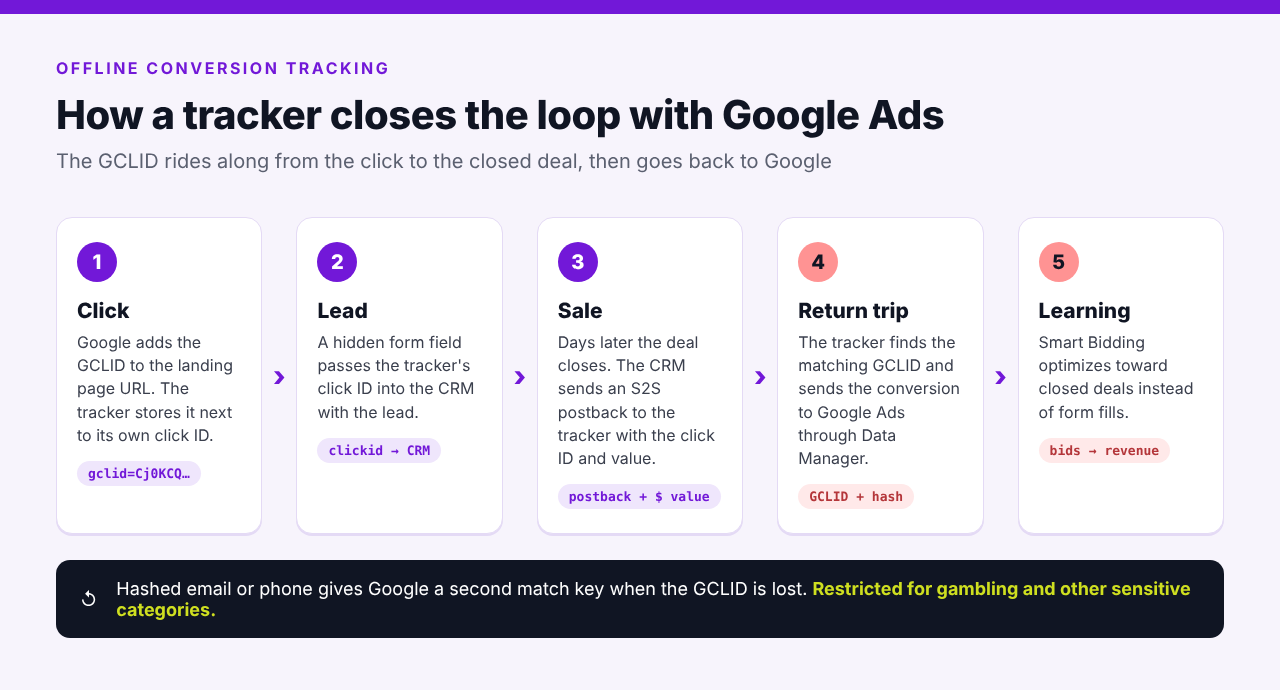
Here’s how the loop runs:
- The click. Google adds the GCLID to the landing page URL, and the tracker stores it next to its own click ID.
- The lead. A hidden form field passes the tracker’s click ID into the CRM along with the lead.
- The sale. When the deal closes, the CRM or offer platform sends an S2S postback to the tracker with that click ID and the deal value.
- The return trip. The tracker looks up the GCLID that belongs to the click ID and sends the conversion to Google Ads through Data Manager, with hashed user data where it’s allowed.
- The learning. Smart Bidding now optimizes toward deals instead of form fills.
Your CRM never needs to know what a GCLID is. It only hands back the click ID it received, the same S2S postback logic we cover in our guide to server-side tracking. Meta and TikTok take conversions back in a similar way, as our Meta Conversions API guide shows.
Setting It Up for Lead Gen
Decide Which Events Google Should Learn From
Send Google the events that predict revenue, not every status change in your CRM. Many lead gen accounts use two conversion actions: a qualified lead, which happens within days, and a closed deal with a value. Make the one closest to revenue primary for bidding and keep the other secondary, so Smart Bidding doesn’t count the same person twice.
The qualified-lead event also solves the 90-day problem. If your sales cycle runs longer than three months, Google suggests uploading an earlier offline event that happens inside the window (source). For more on how window length changes what gets credited, see our explainer on the attribution window.
Keep the Click ID Attached to the Lead
Pass the tracker’s click ID into a hidden form field and make sure the CRM saves it on the lead record. Submit a real test lead before launch and follow it all the way to the CRM.
A missing ID is the one problem no upload can fix later.
Send Values, Not Just Counts
A closed deal worth $4,000 and one worth $400 shouldn’t look the same to Smart Bidding. Pass the deal value with each conversion, or an expected value for qualified leads, so value-based bidding has something real to work with.
Mind the Clock
Two timing rules catch people out. A conversion timestamp that lands before the click, usually because of a time zone mismatch, gets rejected. And Google reports conversions by click time by default, so a deal uploaded today can show up in last month’s numbers. Add the “by conv. time” columns when you compare Google Ads with your CRM, as Google’s troubleshooting guide recommends.
Practitioner’s tip: let sales, not marketing, define the qualified-lead event. “Form submitted” tells Smart Bidding nothing new, while “spoke to sales and confirmed budget” usually separates real buyers from tire kickers. Give that event a value based on your own close rate and deal size: if qualified leads close at 20% and the average deal is $2,500, value each one at $500 (illustrative numbers). Then send the closed deal with its real value as a separate action. Bidding gets enough volume early and accurate values later, and you can check in your tracker whether the close rate holds per campaign before you trust the numbers.
iGaming Deposits: What Google Lets You Send
This is where iGaming teams need to slow down. Google’s customer data policies list gambling among the sensitive categories, and conversions in sensitive categories can’t be used for measurement with enhanced conversions. The only carve-out points to Google’s separate personalized ads rules for gambling, which are narrow.
GCLID-based offline conversion import sends no customer data, so it sits outside that policy. For operators and iGaming affiliates, that’s the practical route: registrations, KYC approvals and first-time deposits (FTDs) sent back as click conversions, without hashed player data.
It still gets you most of the way. Smart Bidding can chase depositors instead of sign-ups, which is where the budget usually leaks.
- Send the FTD, not only the registration. If KYC sits between the two, our piece on KYC and AML from a tracking perspective shows which events to report.
- Watch the 90-day window. Later milestones such as a third deposit may fall outside it, so pick events that happen early enough to count.
- Protect the certification. Gambling ads on Google need a valid certification, and our breakdown of Google’s 2026 gambling ad rules covers what can get it revoked.
Voluum has been on Google’s list of certified click trackers since October 2026. That’s a credibility check, not a loophole: it doesn’t change any of the measurement rules above.
How Often Should You Import Offline Conversions?
As often as your conversions happen, within Google’s two hard limits: no sooner than 6 hours after the click and no later than 90 days. Daily or continuous uploads keep Smart Bidding’s signal fresh. A weekly batch leaves the algorithm bidding on old information for most of the week.
Then allow for processing. According to Google, uploaded conversions usually show up within 12 hours, and GBRAID or WBRAID conversions can take up to 72 hours, so don’t judge yesterday’s bid changes on this morning’s numbers (source).
With a tracker, cadence stops being a chore. Voluum sends each conversion to Google right away, including conversions you add manually, and if Google rejects it as too recent, Voluum retries it later, so conversions on fresh clicks aren’t lost.
Why Google Rejects Offline Conversions
Most failed uploads come down to a handful of errors. Here’s what each one means and how to fix it, based on Google’s offline import troubleshooting guide and FAQ.
| Error | What it means | Fix |
|---|---|---|
| Identifiers or iOS URL parameters are too old | The click is older than 90 days or outside the conversion window | Upload more often or send an earlier milestone event |
| Click too recent | The click happened less than 6 hours ago | Retry after 6 hours |
| Invalid conversion time | The conversion time is earlier than the click | Check time zones; Google suggests adding 1 to 2 days if needed |
| Wrong Google Ads account for clicks | The conversion action name doesn’t exist in that account, or its source isn’t “Import from clicks” | Match the name exactly and check cross-account tracking in manager accounts |
| User-provided data not hashed | Email or phone formatting broke the hash | Lowercase and trim emails, use E.164 phone numbers, leave country and zip unhashed |
| Unknown clicks | The conversion couldn’t be tied to a Google ad | Expected for part of an enhanced conversions upload; investigate only if every row shows it |
Even successful uploads can go missing from reports. A conversion action set to count “One” per click discards repeats, and Google filters out conversions it considers invalid or spam.
How It Works in Voluum
Voluum keeps the click ID chain together and sends conversions back to Google Ads for you, so your team spends its time on bids and creatives instead of upload files. The Google integration sends conversions through Google’s Data Manager, including enhanced conversions with SHA-256 hashed match keys. Here’s the setup, based on Voluum’s Google Ads integration guide.
- Track Google traffic with the direct method. Voluum recommends direct tracking for Google Ads because of parallel tracking: you add the direct tracking script to your page and paste only the tracking parameters into Google’s URL options (setup guide).
- Connect Google Ads in Automizer. Go to Automizer, then Traffic sources, click Add traffic source and Add new integration, sign in with Google and allow access. The same connection pulls campaign costs into Voluum automatically.
- Create a conversion action in Google Ads. Voluum’s guide uses a Website conversions action, and you don’t need to set up a tag event for it. Note its exact name.
- Generate the postback URL. In Settings, open Integrations, click Generate next to Google in the traffic source integrations section, enter the conversion action name exactly as in Google Ads and copy the URL.
- Paste it into your Google Ads traffic source in Voluum as the traffic source postback URL and save.
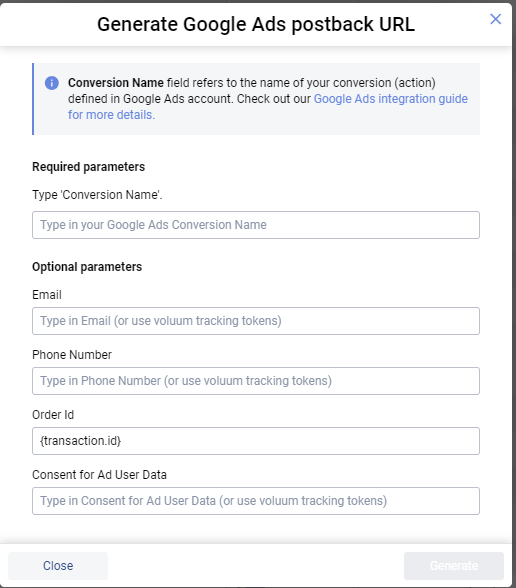
The postback generator also has optional fields for enhanced conversions: Email, Phone Number, Order Id and Consent for Ad User Data. Each takes a fixed value or a Voluum tracking token, so the email and phone your CRM sends in its postback can flow straight through. Voluum hashes them with SHA-256 before they go to Google through Data Manager. The consent field carries the consent signal Google requires for users in the European Economic Area. For gambling accounts, leave Email and Phone Number empty and let the GCLID do the matching.
Order Id is listed as optional, but treat it as required. Google accepts conversions sent to a website conversion action only when each one carries a unique transaction ID, and rejects the rest. Keep the prefilled {transaction.id} token and check that your offer or CRM actually sends a transaction ID in its postback. If it can’t, send your conversions to an “Import from clicks” conversion action instead, which doesn’t need one.
From then on, every conversion your offer, CRM or operator reports to Voluum by S2S postback is forwarded to Google Ads with the GCLID that Voluum saved as the external ID. Tracking needs to be set at the campaign level in Google Ads for the match to work.
For iOS clicks without a GCLID, Voluum can store GBRAID or WBRAID as the external ID and pass its type with the {externalidparameter} token, so those conversions still have a key. For conversions that never reached Voluum, Conversion upload lets you add them by click ID, up to 50,000 an hour, using the same logic as a postback. Those conversions are forwarded to Google Ads too.
Where it falls short: Voluum can only send what your postbacks give it. If the CRM never returns the click ID, no tracker can rebuild the match. Voluum’s docs also note that Google may reject some conversions from iOS visits.
If you work with iGaming CRMs too, our guide to using Voluum data inside iGaming CRMs covers the other direction, from tracker to CRM.
Send Google the Conversions That Pay
If your Google campaigns still optimize toward form fills, the fix is a closed loop: click ID in, revenue out. Voluum handles the return trip through Data Manager, next to S2S postbacks and cost sync for your other traffic sources. Compare Voluum plans to see which one fits your team. The Google Ads integration is available from the Start-up plan.
Frequently Asked Questions
What are Google enhanced conversions?
Google enhanced conversions add hashed first-party data, such as an email address or phone number, to the conversions you report in Google Ads. Google matches those hashes with signed-in Google accounts to credit conversions it couldn’t connect to an ad otherwise, for example after a lost cookie or a device switch. The data is hashed with SHA-256 before Google receives it.
Is offline conversion tracking the same as enhanced conversions for leads?
Not quite. Classic offline conversion tracking matches each uploaded conversion to a click through the GCLID. Enhanced conversions for leads is Google’s upgraded version: it adds hashed user data from the lead form, so conversions can still be matched when the GCLID is missing. Google now recommends upgrading offline imports to enhanced conversions for leads where your vertical allows it.
How long is a GCLID valid for offline conversion import?
Google keeps the GCLID for 90 days, so you can import a conversion up to 90 days after the click, as long as it also falls inside the conversion action’s conversion window. Clicks younger than 6 hours are rejected as too recent. If your sales cycle is longer than 90 days, upload an earlier milestone, such as a qualified lead.
Can iGaming advertisers use Google enhanced conversions?
Generally not for measurement. Google’s customer data policies treat gambling as a sensitive category, and conversions in those categories can’t be measured with enhanced conversions, apart from a narrow exception tied to the personalized ads rules. iGaming advertisers can still send registrations and deposits back through GCLID-based offline conversion import, which uses no customer data.
How often should I upload offline conversions to Google Ads?
Upload daily or continuously, as conversions happen. Google rejects clicks younger than 6 hours and can’t import clicks older than 90 days, and conversions usually take up to 12 hours to appear after upload. A tracker that forwards conversions as postbacks arrive removes the need for scheduled uploads altogether.



 Facebook
 Telegram


