

A 3.0 ROAS can lose money, and a 1.5 ROAS can make it. Picture two campaigns on the same Monday. One sells a product at a 25% margin and reports a ROAS of 3.0. The other promotes a CPA offer that keeps 85 cents of every payout dollar after reversals and fees, and reports 1.5.
The first media buyer is thinking about scaling. The second is thinking about pausing. It should be the other way around.
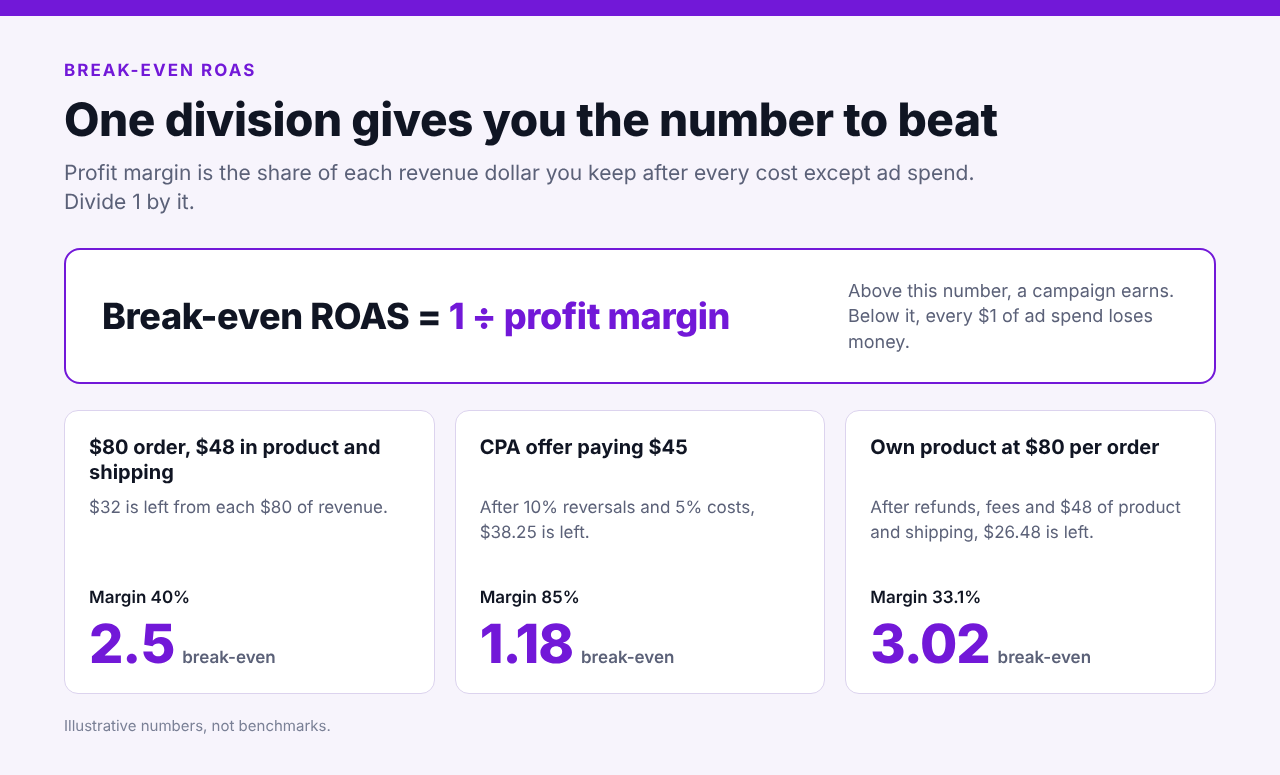
Break-even ROAS is the return on ad spend at which a campaign earns exactly what it costs, with no profit and no loss. Calculate it as 1 divided by your profit margin, written as a decimal. At a 40% margin, break-even ROAS is 2.5, so every $1 of ad spend must bring back $2.50 in revenue.
Below are the formula, a calculator, worked examples for each business model and the way to turn your number into a Voluum rule.
Why a High ROAS Can Still Lose Money
ROAS is revenue divided by ad spend. If you spend $1,000 and the campaign brings back $3,000 in revenue, your ROAS is 3.0, or 300% if you prefer percentages. It’s a clean number, and it’s easy to misread.
ROAS counts revenue, not profit. That revenue still has to cover the product, the payout reversals, the payment fees and the taxes before anything is left over. Break-even is the point where what’s left after all of that exactly equals your ad spend.
This is also why there’s no universal good ROAS. A merchant with a 50% margin breaks even at 2.0, while one with a 25% margin needs 4.0. Your break-even number is the floor, and anything above it is profit.
How to Calculate Break-Even ROAS
You need one input: your profit margin before ad spend. That’s the share of each revenue dollar you keep after every cost except advertising.
Profit margin = (revenue minus all costs except ad spend) ÷ revenue
Break-even ROAS = 1 ÷ profit margin
Say each order brings $80 in revenue and $48 goes to product and shipping. Your margin is $32 ÷ $80 = 40%, or 0.40, so your break-even is 1 ÷ 0.40 = 2.5.
What counts as a cost depends on your model. A merchant counts product cost, shipping, payment fees and refunds. An affiliate counts reversed conversions, tracker and tool fees, taxes and anything else paid per conversion. Leave ad spend out, because that’s the number you’re solving for.
Free ROAS Calculator
Use this ROAS calculator with your own numbers. Pick the affiliate mode for CPA or RevShare offers, or the product mode if you sell your own. Add your current ROAS if you want to see which side of break-even you’re on.
Click here to go to FREE online ROAS calculator!
The calculator also shows the most you can pay in ads per conversion and your break-even ROI, which matters when you set up rules later in this guide.
Worked Examples for CPA, RevShare and Your Own Product
All numbers below are invented for illustration. Swap in your own.
A CPA Offer
Suppose the offer pays $45 per conversion. The network reverses 10% of conversions, and tracker and other costs take 5% of the payout. Of each $45 in reported payout you keep $40.50 after reversals, and $2.25 in costs leaves $38.25.
Your margin is $38.25 ÷ $45 = 0.85, so break-even is 1 ÷ 0.85, about 1.18. In other words, you can pay up to $38.25 in ads for each conversion. A ROAS of 1.5 earns roughly $0.28 for every $1 of ad spend (1.5 × 0.85 minus 1).
On paper, break-even for a CPA offer is 1.0, because the payout is your revenue. Reversals and fees are what push it higher. If your reports count every conversion before reversals, the gap between 1.0 and 1.18 stays invisible until the payout arrives.
A RevShare Offer
RevShare changes the question, because revenue arrives over weeks instead of at the click. Say you pay $50 in ads per first-time depositor, and costs take 5% of what you earn. Break-even is then 1 ÷ 0.95, about 1.05.
Now say a typical player brings in $18 of commission in the first 30 days, $36 by day 60 and $55 by day 90. Your ROAS is 0.36 at day 30, 0.72 at day 60 and 1.10 at day 90. The campaign crosses break-even near the end of month three.
Judge that campaign at day 7 against 1.05 and you’ll pause every RevShare campaign you run. Measure each cohort at the same age instead, and match the time frame of your rules to the payback window. Our guide on shifting from FTDs to LTV goes deeper on measuring player value.
Your Own Product
A store selling its own product has the most cost lines to count. Say the average order is $80, product and shipping cost $48 per order, payment fees take 2.9% of the order value and 4% of orders are refunded or charged back.
After refunds you keep $76.80 per order. Payment fees take $2.32 and product and shipping take $48, which leaves $26.48. Your margin is $26.48 ÷ $80 = 0.331, so break-even is about 3.02. A ROAS of 3.0 sits just under it, and 3.5 earns about $0.16 for every $1 of ad spend.
Our guide to tracking Shopify and CheckoutChamp conversions in one place is a good starting point if your order data lives there.
ROAS vs ROI vs Target ROAS
People mix these up, so here’s how they relate. ROAS compares revenue to ad spend. ROI compares profit to cost, and Voluum calculates it as (total revenue minus total cost) ÷ total cost × 100%. When both use the same revenue and cost, ROAS equals 1 plus ROI, so a ROAS of 1.5 is an ROI of 50%.
| Metric | Formula | Break-even point | Best used for |
|---|---|---|---|
| ROAS | Revenue ÷ ad spend | 1 ÷ your profit margin (for example 1.18) | Comparing campaigns and sources quickly |
| ROI in Voluum | (Revenue minus cost) ÷ cost × 100% | (Break-even ROAS minus 1) × 100% (for example 18%) | Setting thresholds in Automizer rules |
| Target ROAS | The ROAS you aim for | Set above break-even so profit remains | Planning budgets and bids |
Most teams set a target ROAS with a buffer above break-even, so normal day-to-day swings don’t push a campaign into the red. For the wider set of metrics around these, see our affiliate marketing KPIs guide.
What Quietly Moves Your Break-Even Number
Your break-even point isn’t a constant. A few things shift it without anyone touching the campaign.
Reversal and refund rates come first. A network that reverses 5% of conversions one month and 15% the next has just moved your break-even. Check the rate by network or offer, not only overall.
Costs that scale differently matter too. Percentage costs leave your margin alone when a payout changes, but fixed per-conversion costs don’t. A $2 tool fee takes 4% of a $50 payout and 5% of a $40 one.
The attribution window also plays a part. A longer window credits more late conversions to the campaign, so reported ROAS rises while the traffic stays the same. Compare campaigns that use the same window, and read our attribution window guide before you set one. Which touchpoint gets the credit matters as well, and our overview of attribution models compares the common ones.
Currency is the last one. If you pay for traffic in one currency and earn in another, exchange rates move your margin, and Voluum describes how it handles this in its multicurrency documentation.
Using Break-Even ROAS in Voluum
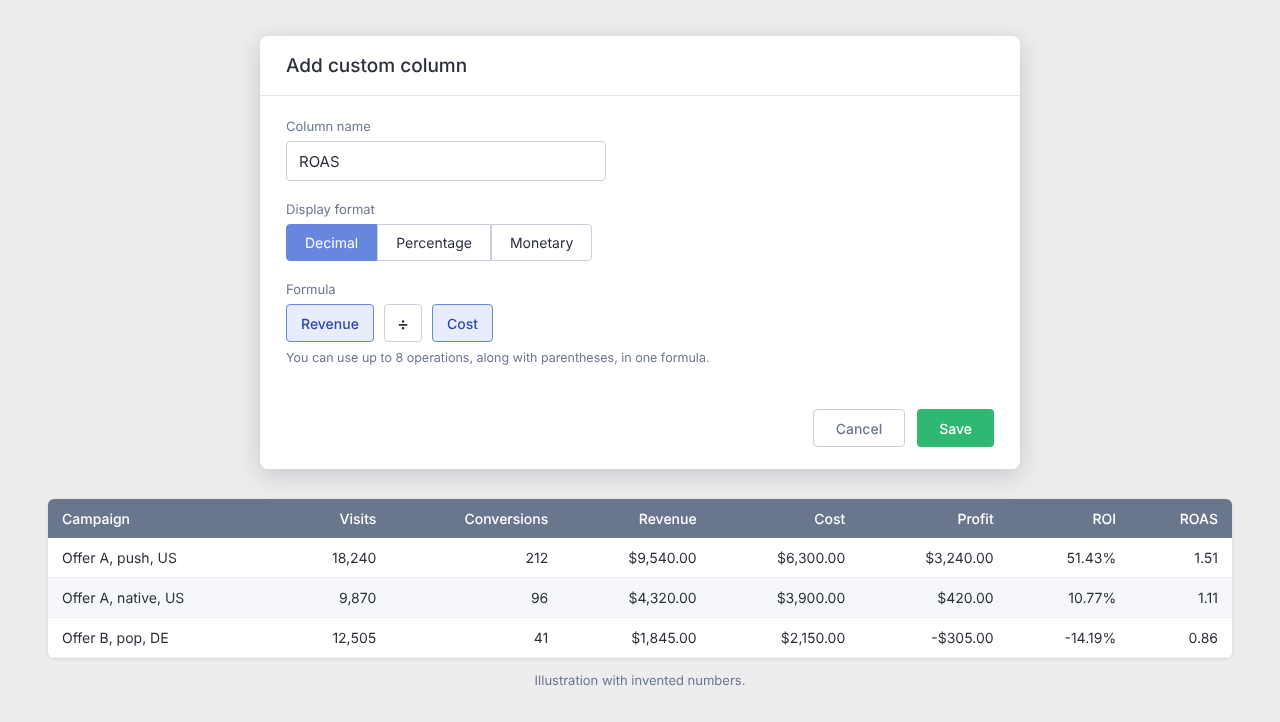
Voluum doesn’t ship a ready-made ROAS column, but you can add one in a minute with a custom column. Custom columns do math on your existing metrics, with up to 8 operations per formula, as the custom columns documentation explains. To add a ROAS column:
- Click Columns in your report, then Add custom column.
- Name the column ROAS and choose Decimal as the display format.
- Build the formula Revenue ÷ Cost and click Save.
Now keep your break-even number next to it. If your break-even is 1.18, any campaign above that in the ROAS column is earning after your other costs, and any campaign below it isn’t.
Automizer rules are the next step. A rule checks a metric against a condition within a time frame, and rule conditions can use ROI, so convert your break-even into an ROI threshold: (break-even ROAS minus 1) × 100%. A break-even of 1.18 becomes an ROI of 18%.
Voluum tracks revenue and ad cost, but not your reversals, fees or product costs. That’s why the threshold isn’t 0%. The extra 18 points are those other costs, built into the number.
A starting rule for a CPA campaign could look like this:
- Applies to: Campaign
- Condition: ROI is lower than 18% and conversions is higher than 20, so a handful of early clicks doesn’t trigger it
- Time frame: 3 days, checked every 8 hours
- Action: Alert, and add Pause once you trust the threshold
Alerts work without a traffic source integration. Pausing a campaign or changing a bid needs a supported traffic source integrated first, as the Rules documentation describes, and the Automizer page lists the supported sources. For RevShare, stretch the time frame to match your payback window, for example 30 days.
For more starting points, see Automated Rules in Voluum for iGaming Traffic, Top 5 Auto-Rule Examples and our introduction to Automizer.
Let Voluum Watch Your Break-Even Number
Knowing your break-even number is half the job. Voluum records revenue and cost for every campaign, so a ROAS column and ROI-based rules can watch the number for you while you work on the next test. See which plan fits your spend on the Voluum pricing page.
Frequently Asked Questions
What Is a Good ROAS?
There’s no universal good ROAS. ROAS is revenue divided by ad spend, so what counts as good depends on your margin. Anything above your break-even point earns a profit and anything below it loses money. A 50% margin breaks even at 2.0, while a 25% margin needs 4.0.
Is Break-Even ROAS the Same as Break-Even ROI?
They’re linked but not identical. When both use the same revenue and cost, ROI equals ROAS minus 1, shown as a percentage. A break-even ROAS of 1.18 matches a break-even ROI of 18%. ROAS is a ratio and ROI is a percentage, and Voluum calculates ROI as (revenue minus cost) ÷ cost × 100%.
How Do You Calculate Break-Even ROAS for a CPA Offer?
Divide the payout by what’s left of it after reversals and per-conversion costs. With a $45 payout, 10% reversals and costs of 5% of the payout, $38.25 remains, so break-even is $45 ÷ $38.25, about 1.18. With no reversals or costs, it’s 1.0.
Do Tracker Fees and Taxes Count in the Calculation?
Yes, when you pay them per conversion or as a share of revenue. Anything you pay besides ad spend lowers your margin and raises your break-even point. Fixed monthly costs are a judgment call: include them for a fully loaded number, or leave them out and treat the result as a contribution margin view.
How Often Should You Recalculate Your Break-Even Point?
Recalculate whenever payouts, reversal rates, product costs, fees or networks change. A quarterly check is a reasonable habit even when nothing seems different, because small shifts in reversals and fees add up quietly.



 Facebook
 Telegram


