
AI-Driven Browsers and Their Impact on Affiliate Tracking (2026)

On August 9, 2026, OpenAI shut down ChatGPT Atlas, its AI browser, less than ten months after launch. If you were planning to optimize for Atlas traffic, that problem solved itself.
The agents didn’t go anywhere, though. Perplexity’s Comet is free and now on Android, Chrome has its own agent built in, and OpenAI moved its browsing agent into the ChatGPT desktop app and a cloud browser. According to HUMAN Security, agentic browsers generated nearly three-quarters of all AI agent traffic it observed in April 2026.
For affiliates and media buyers, the question isn’t which AI browser wins. It’s what happens to a tracked click when software, not a person, is doing the clicking. This article explains what AI browsers do to clicks, redirects, cookies, click IDs and pixels, how to spot and segment agent traffic, and why server-side tracking is the safe default.
The AI Browsers That Matter in Late 2026
An AI browser is a web browser with an assistant that can read pages and, in agent mode, click, type and complete tasks for the user. The category moved fast this year. Standalone AI browsers struggled, while agents built into the browsers people already use kept growing:
| Agent | Where it runs | How it identifies itself | Status |
|---|---|---|---|
| Perplexity Comet | On the person’s own device | An ordinary Chrome user agent | Active and free, Android since August 2026 |
| Chrome auto browse (Gemini) | In a tab of the person’s Chrome | No separate identity described | Launched January 2026, paid tiers, US first |
| Claude in Chrome | Extension in the person’s Chrome or Edge | No separate identity described | Generally available on paid plans since August 2026 |
| ChatGPT cloud browser | On OpenAI’s servers | Signs requests with Web Bot Auth as chatgpt.com | Replaced ChatGPT Atlas and its agent mode |
| Google-Agent | On Google’s servers | Own user agent, some requests signed | Powers Google’s hosted agents |
| ChatGPT Atlas | macOS browser | A Chrome-like user agent | Discontinued August 9, 2026 |
Two details from that table shape everything below. First, most agents run inside a normal Chromium browser, so to your tracker they look like a person using Chrome. Second, agent traffic is still a small slice of the web. eMarketer projects all AI browsers combined at 1 to 3 percent of the global browser market in 2026. It’s worth understanding now, not panicking about.
What Happens to a Tracked Click When an Agent Browses?
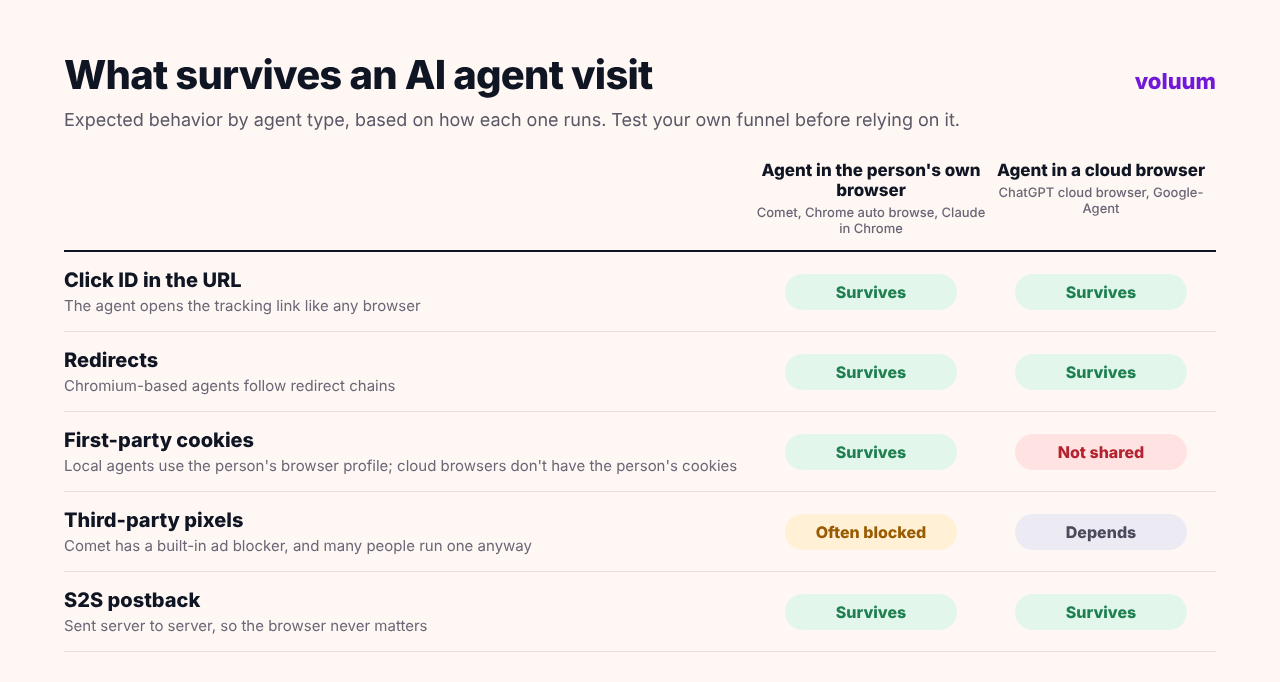
Most of the tracking stack behaves the way it does for a human visitor. The exceptions are where the money leaks.
Clicks, Redirects and Click IDs
When an agent opens a tracking link, it requests the URL like any Chromium browser would. Redirects are followed, URL parameters travel along, and your tracker creates its own click ID as usual. In other words, the mechanics of redirect tracking don’t break.
What changes is how the agent arrives. A person scrolling a feed clicks your ad. An agent asked to “find a good VPN deal” may search, read comparison pages and go straight to a brand’s site, never touching an ad at all. Nothing is lost in your tracker, because there was never a tracked click to begin with. The commission simply goes to whoever owns the page the agent landed on.
Cookies and Sessions
Agents that run in the person’s own browser, such as Comet, Chrome auto browse and Claude in Chrome, use that browser’s profile and cookies. Cloud browsers are different. ChatGPT’s cloud browser runs on OpenAI’s servers, without the person’s cookies, so any attribution that depends on a cookie set during an earlier visit won’t find it there.
Pixels and Ad Blockers
Comet includes a built-in ad blocker, and ad blockers routinely stop third-party tracking pixels as well as ads. So a conversion pixel that fires in the browser is more likely to go missing when an AI browser is involved. A server-to-server postback isn’t affected, because it never touches the browser.
Conversions an Agent Completes
When an agent fills in a form or completes a checkout, the conversion is real: a person asked for it. But the session looks unusual. Pages load and forms complete faster than any human types, and cloud browsers connect from data center IP addresses. Fraud filters built to catch bots can flag these conversions, and some advertisers may question whether an agent-completed lead is worth a full payout. Expect this to become a negotiation point in affiliate deals.
How to Spot and Segment Agent Traffic
You can’t rely on the user agent. Comet reports itself as ordinary Chrome, and so do most agents that run inside a person’s browser. Identification works in layers instead:
- Request signatures. Some cloud agents sign their requests with Web Bot Auth, a proposed standard based on HTTP Message Signatures. ChatGPT’s cloud browser signs as chatgpt.com, and Google is testing signatures for Google-Agent. Security and bot management tools can verify these.
- Network signals. Cloud agents connect from data centers rather than home or mobile networks. In your tracker, break reports down by ISP and connection type to see that traffic separately.
- Behavior. Very short time from click to conversion, no hesitation on forms and identical paths across many visits are typical of automation, whether it’s a helpful agent or a bot.
- Referrers. Visits that arrive from AI assistants often carry the assistant’s domain as the referrer, which you can report on as its own segment.
In Voluum, that means building a report by ISP, connection type, browser and referrer, and watching conversion timing alongside your usual affiliate marketing KPIs. If a segment converts but gets rejected by the network, or looks like ad fraud in its timing, you’ll see it before it eats your margin. Voluum’s MCP integration also lets you ask an AI assistant to pull these breakdowns for you, which is a fitting use of an agent.
How to Test Your Own Funnel With an AI Browser
The best evidence is your own. Here’s a simple protocol you can run in under an hour with Comet and any agent you have access to:
- Click test. Ask the agent to open your tracking link. In Voluum, check that the visit appears with the right traffic source and that the click ID reached the offer URL.
- Redirect test. Repeat through your full chain, including the lander and any network redirects, and confirm every parameter arrives at the final URL.
- Conversion test. Let the agent complete a test conversion and check whether it arrives by postback, by pixel or both. With Comet’s ad blocker on, compare the two.
- Cookie test. Visit once yourself, then ask a cloud agent to return and convert. Check which attribution methods still connect the two visits.
- Segment test. Look up the test visits in your reports and note which fields would let you separate agent traffic: ISP, connection type, browser, referrer or timing.
Why S2S Tracking Is the Safe Default
Look back at the picture above. Two things survived every scenario: the click ID in the URL and the server-to-server postback. That’s not a coincidence. Both work without relying on the browser to remember anything or to run a script.
That’s the heart of cookieless affiliate tracking. Pass a click ID with every visit, store it on the network’s side and have the network return it in a postback when the conversion happens. Whether a person, an agent in their browser or a cloud agent completed the conversion, the postback still arrives. Our comparison of the tracking pixel and postback URL covers the trade-offs in more depth.
The same applies on the way back to ad platforms. Sending conversions server-side, through Meta’s Conversions API or TikTok’s Events API, which our TikTok ads tracking guide explains, keeps their algorithms fed when browser signals thin out. And when numbers between platforms and your tracker start to drift, check the attribution window and the most common tracking issues before blaming the agents.
A Word on Security
Agentic browsers carry a risk that matters to anyone running landers and offers. Researchers at Brave showed that hidden instructions on a web page could hijack Comet’s assistant, a class of attack called indirect prompt injection. Vendors have added safeguards since, but the lesson for affiliates is simple: don’t put anything on a page that you wouldn’t want an agent to read and act on, and expect networks and ad platforms to scrutinize agent-driven traffic more closely over time.
Track Every Visitor, Human or Not
Whoever does the clicking, Voluum tracks the visit with its own click ID, records conversions server-to-server and lets you break traffic down by ISP, connection type, browser and referrer, so agent traffic is visible instead of hidden in your averages. See how Voluum works.
Frequently Asked Questions
What is an AI browser?
An AI browser is a web browser with a built-in assistant that can read and summarize pages and, in agent mode, click, type and complete tasks on the user’s behalf. Examples include Perplexity Comet, Chrome with Gemini auto browse and browser extensions such as Claude in Chrome. Most are built on Chromium, the engine behind Chrome.
Is ChatGPT Atlas still available?
No. OpenAI shut down ChatGPT Atlas on August 9, 2026, less than ten months after launching it on macOS. Its browsing capabilities moved into the ChatGPT desktop app and a cloud browser that runs on OpenAI’s servers and signs its requests with Web Bot Auth.
Do AI browsers break affiliate tracking?
Not the core mechanics. Agents follow redirects and keep click IDs in URLs like any browser. The risks are elsewhere: ad blockers in some AI browsers stop tracking pixels, cloud agents don’t share the user’s cookies, and agents may skip ads entirely. Server-to-server postbacks are not affected by any of these.
How can I identify AI agent traffic?
Not by user agent alone, because agents such as Perplexity Comet report themselves as Chrome. Some cloud agents sign requests with Web Bot Auth, and others can be spotted by data center IP ranges, very fast form completion or AI assistant referrers. In a tracker, segment by ISP, connection type, browser and referrer.
What is cookieless affiliate tracking?
Cookieless affiliate tracking attributes conversions without relying on browser cookies. The tracker passes a unique click ID to the offer, the network stores it and returns it in a server-to-server postback when the visitor converts. Because the browser isn’t involved, it works with ad blockers, privacy settings and AI agents.



 Facebook
 Telegram


