
AI for Media Buyers: 7 Workflows With Voluum MCP (Claude and ChatGPT)

It’s 8:40 on a Monday. You have forty campaigns, six open tabs and a hunch that something broke over the weekend. By the time you find it, say a postback that quietly stopped firing on Friday night, it has already eaten two days of data.
Hunting for problems like that is exactly the kind of work an AI assistant can take off your plate, as long as it can see your real numbers.
Short answer: AI for media buyers works best on the unglamorous jobs: scanning for problems, auditing costs and writing the report. Connect Claude or ChatGPT to Voluum with MCP, read-only by default, and the assistant works from your actual campaign data instead of guessing.
AI for affiliate marketing usually means ad copy and creatives. This guide is about the other side of the job: putting an AI assistant to work on your tracking data. It’s for media buyers, affiliates and agencies who already use one. It covers how the connection works, three rules that keep the answers honest, seven workflows with prompts and example answers, and how to connect more of your stack so results land where you work. If you’re after bulk edits and account cleanup instead, see our overview of Voluum MCP, which covers those.
What Voluum MCP Does, and What It Doesn’t
MCP, the Model Context Protocol, is an open standard that lets AI tools connect to outside systems. Voluum runs an MCP server that exposes your campaign data and actions to any assistant that supports the standard: Claude, ChatGPT, Perplexity, Cursor or a custom bot. You pick the assistant. Voluum is the data source.
Access is controlled in two modes. Read-only is the default, and write access is opt-in. Login uses OAuth, so you sign in with your Voluum credentials once and the assistant gets a scoped token. No code or developer help is needed.
One thing to keep in mind: once you connect an assistant, your data is subject to that AI vendor’s terms. Voluum respects the read or write settings you choose, but what happens to the data on the vendor’s side is between you and the vendor. For that reason, start read-only. Every workflow below only reads from Voluum.
Connect Claude or ChatGPT in a Few Minutes
In Claude, open Settings, then Connectors, find Voluum and click Connect. Log in to Voluum, review the settings and authorize. Voluum’s guide covers the Claude connection step by step, and it’s available on Claude Pro and Max. ChatGPT needs developer mode switched on and the Voluum MCP address added as a plugin, which the ChatGPT guide walks through. Both end with the same screen: sign in to Voluum and authorize.
Menus on the AI side change more often than Voluum’s, which is why the guides above are worth bookmarking.
Three Rules to Paste Before Every Analysis Prompt
AI assistants are good at producing confident, well-formatted answers, including when the data doesn’t support them. Voluum’s own guide to MCP prompts recommends putting three rules at the top of any analysis prompt, and they’re the most useful habit in this article.
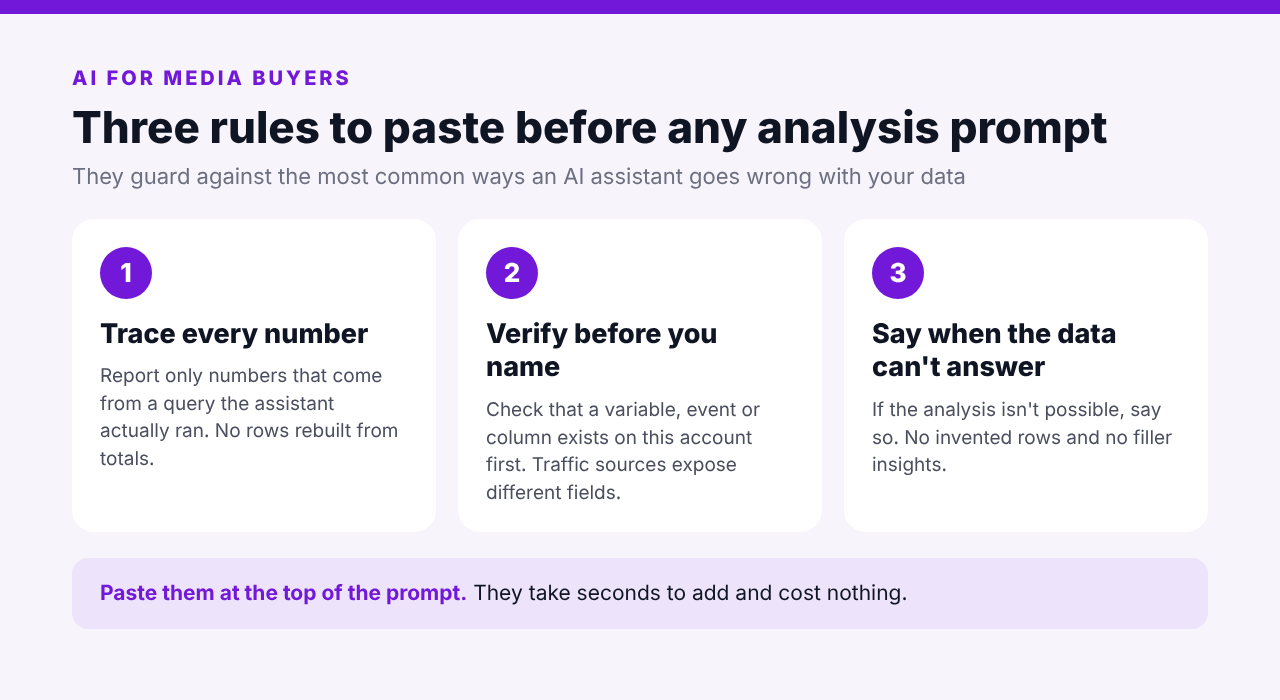
In plain language: every number must trace back to a query the assistant actually ran. Don’t mention a variable, event or column before checking that it exists on this account, because different traffic sources expose different custom variables. And if the data can’t support the analysis, say so instead of filling the table anyway. Paste all three, then add the workflow prompt below it.
Each prompt in the next section is a shortened version of one from Voluum’s guide, so swap in your own campaign names, thresholds and workspaces. The example answers show the shape of a good response, and you should still spot-check the numbers against your Voluum reports before acting.
Seven Workflows for AI Media Buying
1. The Morning Lowlights Digest
The first job is the one from the hook: find what broke overnight. Instead of opening every campaign, ask the assistant to compare yesterday with your recent baseline and list only the problems.
Pull yesterday's data from my Voluum account and compare it with the prior 7-day average. Tell me which campaigns dropped more than 30% in profit or conversions, which spent more than $100 with zero conversions, and any cost or postback anomalies. Skip campaigns with fewer than 100 visits.Profit down more than 30%: Taboola – US – Nutra advertorial earned $212 against a $396 daily average (-46%), with 14 conversions instead of 21. PropellerAds – Brazil – Sweeps CC submit earned $88 against $140 (-37%).
Spend with zero conversions: Adsterra – Poland – Sports betting spent $134 on 1,120 visits with no conversions. Last week it averaged 9 conversions a day.
Postback check: the Adsterra campaign’s conversion rate fell from about 0.8% to 0.00%. That points to a postback problem, not a traffic problem, so check the offer’s postback URL first.
Cost discrepancies: none found.
Read the postback line twice. The assistant spotted a pattern (a campaign that normally converts suddenly doesn’t), but it can only suggest a cause. The check itself is still yours.
2. Week-Over-Week Movers, With a Reason
Dashboards show what changed. They rarely say why. This prompt asks for movement and a one-line explanation, and keeps new launches in a separate bucket so they don’t read as real change.
Compare the last 7 complete days with the prior 7 days for my top 50 campaigns by spend. Flag only changes greater than +/-20% in profit, cost, conversions or CPA. Add one sentence on the likely reason. Group the results into top movers up, top movers down and new campaigns. Use the same conversion-time mode for both weeks.Top movers up: Zeropark – Mexico – Casino FTD, profit $1,940 against $1,210 (+60%). Conversions rose from 188 to 261 while CPA held near $6.40, so this is volume growth, not a payout change.
Top movers down: Facebook – Germany – Lead gen quiz, profit $620 against $1,050 (-41%). Cost is flat but conversion rate fell from 6.2% to 4.1%, which suggests creative fatigue or a lander change.
New this week: TrafficStars – Spain – Casino FTD launched Tuesday with $410 spent and 12 conversions. Too early to judge.
The last line of the prompt matters more than it looks. Voluum reports conversions by visit time or by conversion time, and mixing the two makes late-funnel campaigns look like they dropped when the conversions simply haven’t arrived yet. Our guide to attribution windows explains why.
3. The Cost Integrity Audit
Bad cost data quietly ruins every decision built on it. An audit prompt checks for the usual suspects: visits with no cost, cost that jumps without a reason, and a cost model that doesn’t match the deal.
Audit cost integrity in my Voluum account for the last 7 days. List campaigns with visits but zero cost, campaigns whose cost per visit is 3x or 1/3 of their 30-day average, and campaigns where the cost model looks wrong for the deal type. Group results by traffic source.Two issues found.
Taboola: Taboola – US – Nutra advertorial shows $0 cost on Nov 14 and 15 despite 6,300 visits, which looks like a failed cost sync. At the campaign’s $0.065 average cost per visit, about $410 of spend is missing.
PropellerAds: PropellerAds – Brazil – Sweeps CC submit had a cost per visit of $0.034 yesterday against a 30-day average of $0.011, about 3.1x higher.
No cost-model mismatches found.
If you’ve connected your traffic source’s reporting to the assistant, you can add a second step: compare Voluum’s tracked cost with the source’s own spend and show the difference before changing anything. That cross-check is where connecting more tools pays off, as the section on connected platforms below explains.
4. Underspending Winners
Most optimization advice is about cutting. This prompt looks for the opposite: efficient campaigns that are starved of budget.
Find campaigns and zones with a conversion rate or CPA in the top quartile but spend in the bottom quartile over the last 14 days, with at least 30 conversions. Tell me which could absorb more budget. Skip anything with weak statistical signal.Three candidates passed the filters:
1. Zeropark – Mexico – Casino FTD, zone 48213: 41 conversions at a $4.90 CPA against a $7.20 account average, with only $201 spent in 14 days.
2. Taboola – Canada – Nutra advertorial: 33 conversions at a $19.40 CPA against $27.10, $640 spent.
3. PropellerAds – Philippines – Casino FTD: 37 conversions at a $5.60 CPA against $8.10, $207 spent.
Eleven other sources were skipped for having fewer than 30 conversions.
The volume filter does the real work here. Without a minimum conversion count, the assistant will happily recommend scaling a source that got lucky twice. Before you raise a budget, compare the CPA with your break-even point, as described in our break-even ROAS guide.
5. Zone and Sub-ID Breakdown With Recommendations
Placement-level analysis is where many media buyers lose hours, because each traffic source stores its zone or publisher ID in a different custom variable. The prompt below makes the assistant check first.
For campaign PropellerAds - Brazil - Sweeps CC submit, pull the last 14 days grouped by the zone variable this source actually populates. Pull a 5-row sample first to confirm the variable has data, and if it's empty, stop and tell me. Then give me the top 10 zones by spend, any zone with $30 or more spent and zero conversions, and any zone with at least 5 conversions and a CPA below $4.00.Variable check: custom variable 1 (zone ID) is populated in 5 of 5 sample rows, so I used it.
Pause candidates ($30+ spent, zero conversions): zone 91822 ($58, 1,940 visits), zone 77410 ($44, 1,310 visits) and zone 63055 ($37, 1,022 visits). Together that’s $139 with no conversions.
Scale candidates (5+ conversions, CPA below $4.00): zone 30571 (9 conversions, $3.10 CPA) and zone 45198 (6 conversions, $3.65 CPA).
These are recommendations only. I haven’t changed anything.
The same approach works for creative IDs, but only if your traffic source passes creative data. If it doesn’t, the right answer is “I can’t break this down,” and the third rule above is what makes the assistant say so. Our overview of affiliate marketing KPIs helps you decide which columns to ask for.
6. The Funnel Leak Detector
Multi-step funnels hide their problems in the middle. This prompt checks which events each campaign actually tracks, skips the ones with no funnel to leak from, and flags steps that look broken or suspiciously good.
For each of my top 30 campaigns by spend, first list the conversion events it actually tracks. Skip campaigns that only track a single step. For the rest, compute step-by-step conversion rates and flag any step much worse than the others, or a step rate that looks too good to be true. Suggest likely causes, but mark them as hypotheses.30 campaigns checked. 9 track multiple steps. 21 track only visits to purchase, so I skipped them.
Flag 1: Taboola – US – Nutra advertorial. Checkout to purchase fell to 22% from a 41% 30-day average, while earlier steps are stable. Hypotheses: a payment form problem, a change on the offer page, or delayed purchase postbacks. Check the last 24 hours before drawing conclusions.
Flag 2: Facebook – Germany – Lead gen quiz. The step from form view to form start shows 64%, against about 15% elsewhere in this campaign. Hypothesis: an event firing on page load instead of on interaction. This is not a diagnosis.
“Hypothesis, not diagnosis” is a useful phrase to put in any prompt where the assistant has to explain a cause. It keeps a guess from reading like a fact.
7. A Daily Summary Delivered to Slack
The last workflow is the one that keeps paying off: a report that writes and sends itself. A pasted prompt runs once, so for this one you need a recurring task in your assistant and your chat tool connected.
Every weekday at 8:00 Europe/Warsaw, for workspace Affiliate team, post a plain-text summary to #daily-performance in Slack. Include yesterday's visits, conversions, cost, revenue, profit and ROI against the prior 7-day daily average, the 3 best and 3 worst campaigns by profit, and any campaign whose profit has declined three days in a row.Daily summary, Affiliate team, Nov 18
Yesterday: 48,300 visits, 1,104 conversions, $7,910 cost, $10,420 revenue, $2,510 profit, 31.7% ROI. Against the prior 7-day daily average: profit +6%, cost +2%.
Top 3 by profit: Zeropark – Mexico – Casino FTD ($284), Taboola – Canada – Nutra advertorial ($231), Taboola – US – Nutra advertorial ($212).
Bottom 3 by profit: Adsterra – Poland – Sports betting (-$134), Facebook – Germany – Lead gen quiz ($38), PropellerAds – Brazil – Sweeps CC submit ($88).
Watch list: Taboola – US – Nutra advertorial, profit down three days in a row ($318, $265, $212).
Because the summary lands in a channel your team already reads, nobody has to log in to find out how yesterday went. The same prompt can write to email or a shared document instead.
Connect More Than Voluum: CRMs, Chat Tools and Ad Platforms
Voluum is only one of the places your assistant can read from. MCP is a standard, so the same assistant can be connected to a CRM, a chat tool like Slack, an analytics or visualization platform, a spreadsheet, or a traffic source’s reporting at the same time. That changes what you can ask for in two ways.
More data and context. Tracker data tells you which click produced a registration. A CRM tells you what that player did next. An ad platform tells you what it spent. Put them in one conversation and the assistant can compare them: tracked cost against the source’s own spend, Voluum conversions against CRM deposits, or traffic sources against retention. Our guide to using Voluum data inside iGaming CRMs covers the data side of that picture.
Output where you work. The answer doesn’t have to stay in the chat window. The daily summary above lands in Slack. A weekly report can go to email or a shared spreadsheet. An alert can reach the person who can act on it, at the time they can act on it.
Pull yesterday's Voluum conversions by traffic source and the matching first deposits from our CRM. For each source, show registrations, first deposits and the registration-to-deposit rate, then post a summary to #igaming-team in Slack. Flag any source where the rate is more than 20% below its 30-day average.A few cautions. Each extra connection adds another vendor’s terms, so keep access read-only wherever you can. Prompts that post messages need the chat tool connected first. And cross-system analysis is only as good as the shared keys, such as click IDs, so make sure your platforms pass them along. Voluum’s sample prompts guide includes cross-system examples for cost reconciliation and conversion comparisons.
Make Prompts Run Without You
A single pasted prompt runs once. Anything that says “watch,” “alert me” or “every morning” needs to be set up as a scheduled or recurring task in your assistant, and alerts need a messaging tool connected. Once that’s in place, the digest, the cost audit and the daily summary can all run before you open your laptop.
For rules that should act on their own inside Voluum, such as pausing a campaign at a spend limit, Automizer’s native rules are the better fit, because they run inside Voluum without an assistant involved. Our guide to automated rules covers them.
What to Leave to Humans
AI is a good analyst and a poor owner. Voluum’s guide names three things that tend to be noise: fully automated bid changes, blended account-level optimization across workspaces, and creative-level recommendations on traffic sources that don’t expose creative data. To that, add a habit: verify before you act. Spot-check a few rows against the report, ask where a number came from, and treat every recommendation as a draft.
Also remember what the assistant can’t see. It reads your tracker, not your traffic source’s quality checks, your offer’s changes or your gut feeling about a placement. The goal is to spend your time deciding, not hunting for data. For how AI is changing the other end of the funnel, see our piece on AI-driven browsers and affiliate tracking.
Put Your AI Assistant to Work on Your Voluum Data
Connect Claude, ChatGPT or another MCP-enabled assistant to Voluum in a few clicks, start read-only and keep control of what it can do. See how Voluum MCP works.
Frequently Asked Questions
What is Voluum MCP?
Voluum MCP is a connection that lets AI assistants that support the Model Context Protocol read your Voluum data and, if you allow it, take actions in your account. You choose the assistant, such as Claude or ChatGPT, and Voluum acts as the data source. It’s a no-code setup that uses OAuth login.
Can an AI assistant change my Voluum campaigns?
Only if you allow it. Voluum MCP is read-only by default, and write access is opt-in. In read-only mode the assistant can analyze your campaigns and reports but can’t edit, pause or create anything. If you enable write access, Voluum applies the scope you set when you connect the assistant.
Which AI tools work with Voluum MCP?
Any assistant that supports MCP can connect. Voluum’s documentation lists Claude, ChatGPT, Perplexity, Cursor and custom bots, and has setup guides for several of them. The assistant you choose decides which other tools, such as a CRM or Slack, you can connect alongside Voluum.
Is it safe to connect my Voluum data to an AI tool?
Voluum respects the read or write access you set, and login uses OAuth with a scoped token. Once connected, though, your data is subject to the AI vendor’s terms and may be processed in the vendor’s jurisdictions. Start read-only, review the vendor’s terms, and connect only the tools you need.
Do I need coding skills to use Voluum MCP?
No. Connecting an assistant takes a few clicks and a Voluum login, and you work in plain language. You paste prompts, adjust the names and thresholds, and check the answers. Scheduling recurring prompts depends on your assistant’s own features.



 Facebook
 Telegram


