
How to Track Telegram Ads, Mini App Ads and Bot Traffic

How do you track a click when the platform won’t give you a click ID? That’s the first question anyone running Telegram ads runs into, and the answer depends on where you buy the traffic and where the conversion happens.
Official Telegram Ads pass no click ID and report little beyond views. Mini App ad networks behave much more like regular ad networks. And a lot of Telegram funnels end inside a bot, where there’s no web page for a pixel at all. This guide covers all three: how official Telegram Ads differ from Mini App ad networks, how to use a bot’s start parameter as a click ID, how bots can send postbacks, and how to set it all up in Voluum.
If you want the bigger picture first, our pillar on tracking walled gardens compares Telegram with Meta and TikTok.
Official Telegram Ads vs. Mini App Ad Networks
“Telegram ads” can mean two very different things, and they need different tracking setups.
| Official Telegram Ads | Mini App ad networks | |
|---|---|---|
| Who sells it | Telegram, through ads.telegram.org and resellers | Third-party networks that place ads in Telegram Mini Apps and bots |
| Format | Sponsored messages of up to 160 characters with one button | Banners, interstitials, rewarded and native formats, depending on the network |
| Billing | CPM, in TON or euros depending on the account | Usually CPC or CPM, in regular currency |
| Where the button can go | Telegram channels and bots, or external websites with a Euro account | Websites, bots or Mini Apps |
| Click ID | None | Usually a click ID macro, like any ad network |
| Conversion tracking | Telegram Pixel on Euro accounts only | Postbacks, in most cases |
A few details behind that table. According to Telegram Ads partners, Euro accounts can link to external sites and use the Telegram Pixel, while TON accounts point to Telegram destinations and get no pixel or event data. Sponsored messages appear in public channels with 1,000+ subscribers, in bots and in search. On the network side, most Mini App ad platforms offer tokens for click ID, country and cost, plus postbacks, so tracking them feels familiar.
Three Routes for Tracking Telegram Traffic
Pick the route by where the conversion happens: on a website, inside a bot or behind a Mini App ad network’s click.
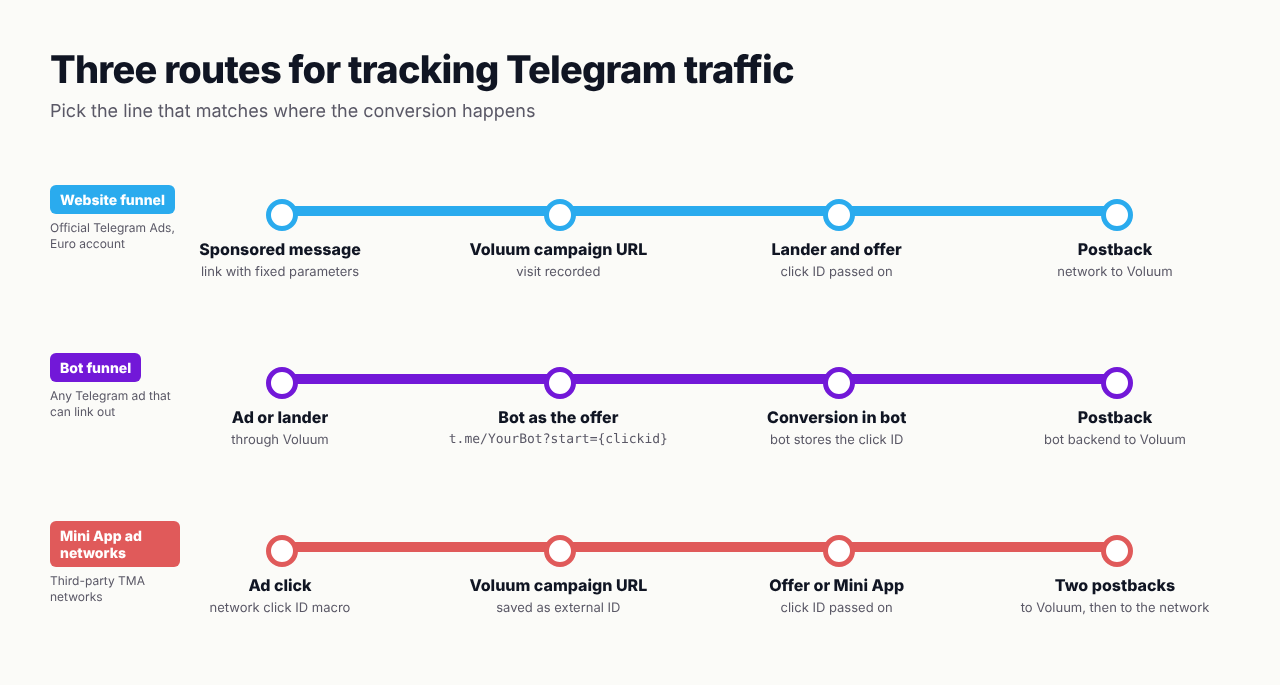
Route 1: Website Funnels From Official Telegram Ads
Because Telegram adds nothing to your link, the link itself has to carry everything you want to report on. Telegram doesn’t append tags on its own, so a sponsored message without parameters arrives as an anonymous visit.
- Create a custom traffic source in Voluum. Add parameters with fixed values for what you want to split by, such as campaign, ad and channel group. There’s no click ID to map, so leave the external ID empty.
- Use one link per ad. Generate a separate campaign URL, or the same campaign with different parameter values, for each sponsored message and targeting group. That’s the only way to compare ads later.
- Put the link in the button. This requires a Euro-funded account, since TON accounts can only point to Telegram destinations.
- Track conversions by postback. The visitor goes through your lander to the offer, Voluum passes its own click ID to the network, and the network reports conversions back with a postback.
- Add costs manually. Telegram bills per thousand views, and Voluum can’t see those impressions. Use Manual Cost Update to enter spend per day or campaign, and Voluum spreads it across the recorded visits.
If you also install the Telegram Pixel on your own pages, Telegram’s dashboard gets conversion data for its delivery. Voluum remains the place where you compare Telegram with your other traffic.
Route 2: Using the Bot Start Parameter as a Click ID
Plenty of Telegram funnels end in a bot: a casino bot, a signals bot, a shop. There’s no web page to put a pixel on, but there’s something better. Telegram bots accept a start parameter in their links, and it can carry Voluum’s click ID straight into the bot.
The trick is to treat the bot as the offer. In Voluum, set the offer URL to the bot’s deep link, with Voluum’s click ID token as the start parameter:
https://t.me/YourBot?start={clickid}When a visitor reaches the offer, Voluum replaces {clickid} with the click ID it just created. The person opens the bot and taps Start, and the bot receives /start followed by that click ID. From there, the bot’s backend does the rest:
# when the bot receives /start with a payload
click_id = payload               # Voluum's click ID
save_click_id(user_id, click_id)  # keep the latest one per user

# later, when the user converts inside the bot
GET https://your-tracking-domain.com/postback?cid={click_id}&payout=25&txid={order_id}
Three rules keep this working:
- Respect Telegram’s limits. A start payload can be up to 64 characters, using only letters, digits, underscores and hyphens. If a value ever contains anything else, encode it with base64url first.
- Store the click ID per user. The conversion may come minutes or weeks later, so the bot needs to remember which click brought each user in. Keeping the most recent one credits returning users to the click that brought them back.
- Send a transaction ID with repeat conversions. Voluum counts the same click ID and transaction ID combination only once, so deposits or purchases after the first one need their own txid.
The same idea works for Mini Apps. A direct Mini App link accepts a startapp parameter, which reaches the app as start_param. Its rules are a bit stricter: up to 64 letters, digits and underscores. For iGaming bots, combine this with separate conversion types for registrations and deposits, as in our guide to tracking first-time deposits.
Route 3: Mini App Ad Networks
Third-party networks that sell ads inside Telegram Mini Apps and bots work like any other ad network, which makes them the easiest to track.
- Add the network as a traffic source in Voluum. Map the network’s click ID macro to the external ID, and its cost token to cost if it has one, so spend arrives automatically.
- Pass extra macros. Placement, app or zone IDs let you build whitelists and blacklists from real performance.
- Report conversions both ways. The affiliate network or your bot sends the postback to Voluum, and Voluum fires the traffic source postback with the external ID, so the ad network can optimize too.
For creative and offer ideas in this format, see our guest post on launching iGaming offers in Telegram Mini Apps. If you’re comparing Telegram networks with other options, our list of the best traffic sources is a good place to start.
What to Watch Once the Data Flows
Telegram traffic looks different from feed-based platforms, so judge it on the same footing as everything else. In Voluum, compare it on the same affiliate marketing KPIs you use for other sources, especially EPV against CPV and eCPA against payout. For official Telegram Ads, those numbers are only as good as your manual cost updates, so add spend daily.
Watch the time between click and conversion too. Bot funnels often convert days later, after a sequence of messages, so a campaign that looks weak on day one may look very different a week on. For iGaming, our iGaming tracking setup guide shows how to report registrations, first deposits and redeposits separately.
And since you’re already in Telegram, you can have conversions come to you: our guide to Voluum conversion alerts in Telegram with n8n shows how to post every new conversion to a chat.
Track Telegram Like Any Other Source
Whether your Telegram traffic ends on a website, inside a bot or behind a Mini App ad network, Voluum gives every visit a click ID, takes postbacks from any backend and puts Telegram next to your other sources in one report. Compare Voluum plans.
Frequently Asked Questions
Can you track conversions from Telegram Ads?
Yes. Official Telegram Ads don’t pass a click ID, so you send each sponsored message to a tracking link with fixed parameters and track conversions by postback from the network. Euro-funded accounts can also use the Telegram Pixel on your website, while TON-funded accounts point only to Telegram destinations and get no pixel.
How do I track conversions inside a Telegram bot?
Use the bot’s start parameter as a click ID. Set the offer URL in your tracker to t.me/YourBot?start={clickid}, have the bot store the click ID it receives with /start, and make the bot’s backend call your tracker’s postback URL with that click ID when the user converts.
What are Telegram Mini App ads?
Telegram Mini App ads are ads shown inside Telegram Mini Apps and bots by third-party ad networks. They come in banner, interstitial, rewarded and native formats, are usually bought on CPC or CPM, and typically support click ID macros and postbacks, so they can be tracked like regular ad networks.
What is the Telegram start parameter?
The start parameter is a value added to a bot link, such as t.me/YourBot?start=ABC. When a user opens the bot through that link and taps Start, the bot receives /start ABC. It can be up to 64 characters long and use letters, digits, underscores and hyphens, which makes it suitable for carrying a click ID.
How do I add Telegram Ads costs to my tracker?
Official Telegram Ads bill per thousand views, which a tracker can’t see, so add the spend with a manual cost update for each day or campaign. In Voluum, Manual Cost Update spreads the amount across the visits recorded in that period. Mini App ad networks often pass cost in a token, so costs arrive automatically.



 Facebook
 Telegram


