
Attribution Window: What It Is and How to Set It per Traffic Source

Your Meta dashboard says 42 sales. Your tracker says 31. Your affiliate network pays you for 33. Nobody is lying, and nothing is broken. You are looking at three referees with three different rules about how long after a pass a goal still counts as an assist.
That rule has a name: the attribution window. It quietly decides which campaigns look profitable, which ones get paused and how much credit each traffic source takes for the same sale.
Short answer: An attribution window is the period after someone clicks or views an ad during which a conversion can still be credited to that ad. Meta and TikTok default to 7-day click and 1-day view, Google Ads to 30 days after a click and Taboola to 30 days. Set yours to match how long your buyers actually take to convert.
Default Attribution Windows at a Glance
Here is what each major traffic source counts out of the box. We checked each platform’s documentation in November 2026. Defaults change, so confirm them in your own account before you compare numbers.
| Traffic source | Default click window | Default view window | Options | Where to change it |
|---|---|---|---|---|
| Meta | 7 days | 1 day, plus 1-day engage-through | Click: 1 or 7 days. View: 1 day or off | Ad set, Attribution setting |
| Google Ads | 30 days | 1 day (3 days for engaged video views) | Click: 1 to 90 days. View: up to 30 days | Settings of each conversion action |
| TikTok | 7 days | 1 day | Click: 1, 7, 14 or 28 days. View: off, 1 or 7 days | Ad group attribution settings |
| Taboola | 30 days | 24 hours | Set per conversion rule | Conversion rule |
| Push, pop and other S2S networks | Matched by click ID | Usually none | Depends on the network and your tracker | Network docs and tracker settings |
What Is an Attribution Window?
An attribution window is a time limit. It opens when someone interacts with your ad and closes after a set number of days. If the conversion lands inside the window, the platform credits the ad. If it lands outside, the sale still happened, but the ad gets no credit for it.
Say someone clicks your Meta ad on a Monday and buys nine days later. With Meta’s default 7-day click window, that purchase never shows up as a result of your ad in Ads Manager. A tracker with a longer window still matches it to the original click.
Most platforms run several windows side by side, one for each type of interaction:
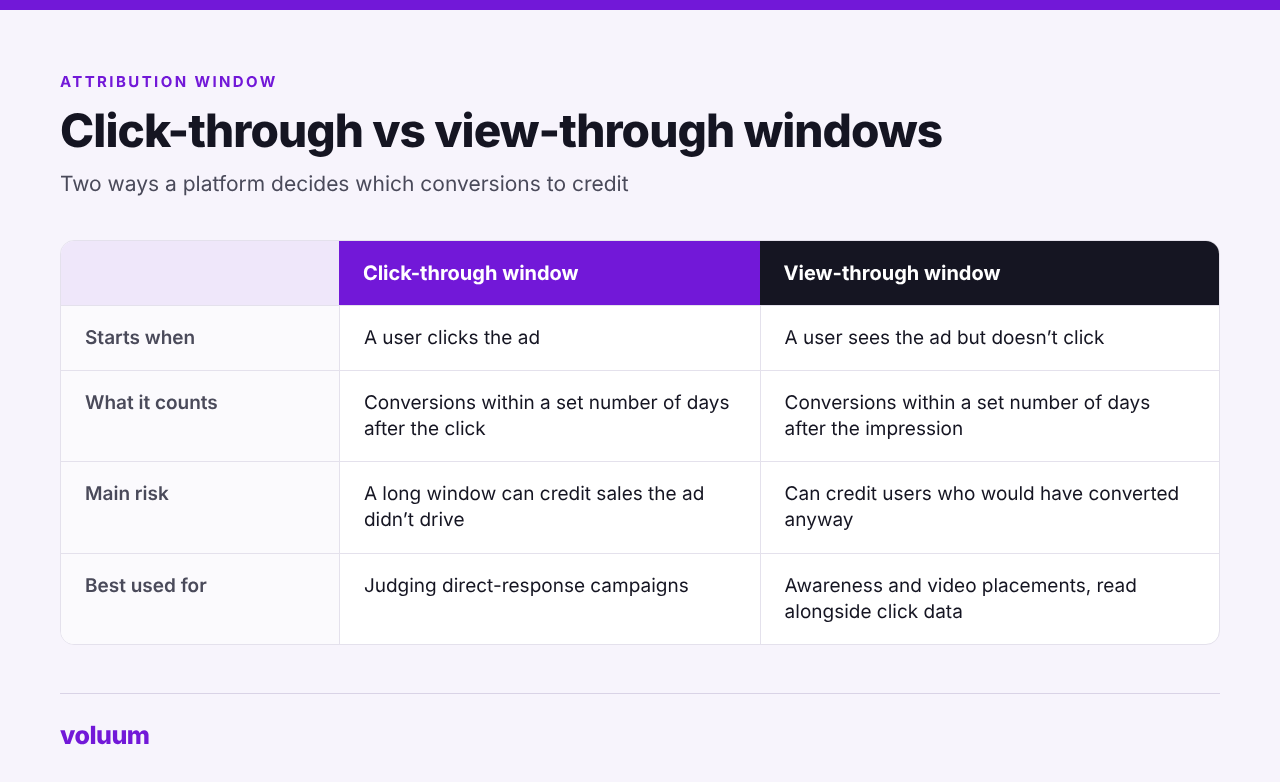
- Click-through window. Starts when someone clicks the ad. For direct response campaigns, this is the one that matters most.
- View-through window. Starts when someone sees the ad without interacting and converts later.
- Engaged-view or engage-through window. A middle ground for video views and social actions such as likes or shares. Meta renamed its version engage-through in March 2026 and now counts non-link clicks there too.
Click Window vs View Window: Which One Should You Trust?
A click is a clear signal of intent. Someone stopped scrolling, tapped and landed on your page. A view is softer. The ad appeared on screen and the person converted later, which might mean the ad worked or might mean they were going to buy anyway.
That’s why view-through numbers deserve a raised eyebrow. They are useful for awareness and video campaigns, where a lot of influence happens without a click. For affiliate offers, lead gen and most performance campaigns, judge results on click-through conversions first and treat view-through as a bonus you verify, not income you bank.
A quick test: compare your platform’s click-only numbers with its default setting. In Meta, the Compare Attribution Settings view shows them side by side. If view-through makes up a large share of reported results, your reported ROAS is probably more optimistic than your bank account.
Default Attribution Windows by Traffic Source
Every platform sets its own rules, and the details matter as soon as you compare one source with another.
Meta (Facebook and Instagram)
Under standard attribution, the default is 7-day click, 1-day engage-through and 1-day view. You set it per ad set, and it does more than shape reporting: Meta also optimizes delivery toward conversions that fit the setting you chose. Click-through can be 1 or 7 days, and view-through can be 1 day or off.
Two 2026 changes are worth knowing. Since March, click-through attribution requires a link click, while likes, shares and other non-link clicks moved to engage-through. And from January 12, 2026, Meta stopped returning 7-day view and 28-day view windows in reporting, so older comparisons that used them won’t line up with today’s numbers.
Google Ads
Google calls it the conversion window and sets it per conversion action. For a new conversion action, the click-through window defaults to 30 days and can run from 1 to 90 days depending on the conversion source. View-through defaults to 1 day, and engaged-view conversions for video default to 3 days.
Keep in mind that the standard Conversions column credits each conversion to the day of the ad interaction, not the day of the sale. Last week’s numbers can keep growing as late conversions come in, so give a campaign time before you call it. If you’re building conversion actions from scratch, the {a(L[‘gads2’], ‘setup steps in our Google Ads tutorial’)} cover where these settings live.
TikTok
TikTok defaults web campaigns to 7-day click and 1-day view, set at the ad group level. Click-through can be 1, 7, 14 or 28 days, and view-through can be off, 1 or 7 days. App campaigns add a separate engaged-view window, which works much like the view-based models we cover in our guide to mobile attribution.
Taboola and Other Native Networks
Taboola counts conversions within 30 days of a click and within 24 hours of a viewable impression by default, and both can be changed per conversion rule. When a user both clicked and viewed, the click wins. Other native networks follow similar logic, but their defaults differ and rarely match Meta or Google, so check each one.
Push, Pop and S2S-Based Networks
Many push, pop and native networks don’t run a pixel-based window at all. They receive conversions through a server-to-server postback that carries the click ID from the original visit. If the click ID matches, the conversion counts, so in practice the window depends on how long the network keeps its click data and on your tracker. Check the network’s postback documentation for any cutoff.
How Your Attribution Window Changes Reported ROI
Here is one campaign seen through four different windows. The numbers are illustrative, but the pattern shows up in real accounts every day.
You spend $1,000 on an offer that pays $40 per conversion. Over the next 30 days, 50 people convert: 20 within a day of clicking, 15 between day 2 and day 7, 10 between day 8 and day 30, and 5 who only saw the ad and converted the same day.
| Window | Conversions credited | Reported revenue | Reported ROAS |
|---|---|---|---|
| 1-day click | 20 | $800 | 0.8 |
| 7-day click | 35 | $1,400 | 1.4 |
| 7-day click + 1-day view | 40 | $1,600 | 1.6 |
| 30-day click | 45 | $1,800 | 1.8 |
Same traffic, same sales. On a 1-day window, the campaign looks like it’s losing money and gets paused. On a 30-day window, it looks like a winner worth scaling. Neither number is wrong; they answer different questions. What goes wrong is comparing a 7-day number from one source with a 30-day number from another and calling it a fair fight.
That’s the whole trap.
How to Choose the Right Attribution Window
There’s no universally correct window. There is a correct window for your offer, and your own data can tell you what it is.
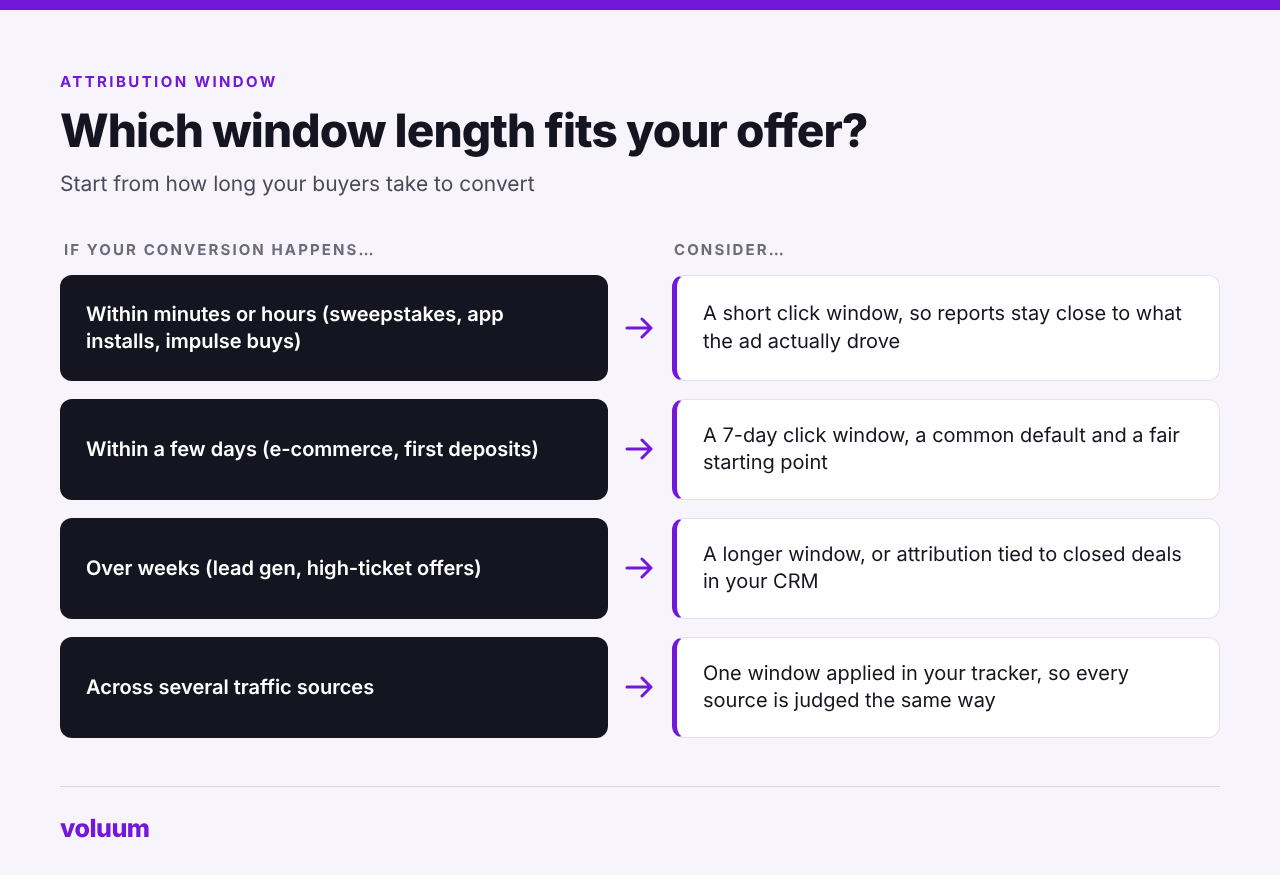
- Measure your real conversion lag. In your tracker, check how long conversions take after the click. If 90% arrive within three days, a 30-day window mostly adds noise. If a big share arrives after a week, a 7-day window hides real results.
- Match the window to the offer. Sweepstakes, app installs and cheap e-commerce products convert fast. Lead gen, high-ticket products and iGaming deposits often take longer, especially when the first deposit comes days after registration.
- Compare before you change. Meta’s Compare Attribution Settings and TikTok’s attribution analytics show how your numbers move under different windows before you commit.
- Leave live campaigns alone. On Meta, the attribution setting also guides delivery, so switching it mid-flight can reset learning and muddy your comparison.
- Align windows before comparing sources. When you judge Meta against Google or native, put them on the same window. Better still, compare them in one tracker that applies one rule to all of them.
Why Your Ad Platform and Your Tracker Show Different Numbers
Even with matching windows, platform and tracker numbers rarely agree to the last conversion, and that’s normal. Three things cause most of the gap:
- View-through and engage-through credit. Platforms count conversions from people who never clicked. A click-based tracker doesn’t.
- Modeled conversions. When privacy settings or ad blockers cut the signal, platforms estimate some conversions. A tracker reports what it actually recorded.
- Different windows and dates. A tracker with a long window keeps matching late conversions to the original click long after the platform’s window has closed.
There’s one more catch. Sending conversions back to a platform through a Conversion API doesn’t override its window. In most setups, if your tracker reports a sale on day 10 and the ad set uses a 7-day click window, the platform receives the event but won’t credit the ad under that setting. Our comparison of Facebook ad tracking software covers how different tools handle this gap.
When the gap looks bigger than these three causes explain, work through the most common tracking issues before you blame the traffic.
How Attribution Windows Work in Voluum
Voluum matches each conversion to the click that caused it through the click ID, whether the conversion arrives by S2S postback, conversion pixel or manual upload. It keeps attributing conversions to the original visit for up to 180 days. A player who registers on Monday and makes a first deposit weeks later still lands on the right campaign, lander and GEO, as long as the click ID is preserved.
Because every traffic source runs through the same rules, you get one consistent window for comparing Meta, Google, TikTok, native and push side by side. With Automizer, the conversions Voluum records can also go back to the ad platforms, so their algorithms optimize on more complete data within their own attribution settings.
Voluum also lets you choose which day a late conversion lands on. By default, it reports conversions by visit timestamp, so a conversion that arrives two days after the visit is counted on the day of the visit, much like Google’s standard Conversions column. Switching conversion registration time reporting to postback timestamp counts it on the day Voluum receives it instead. The option sits in General Settings and applies per user.
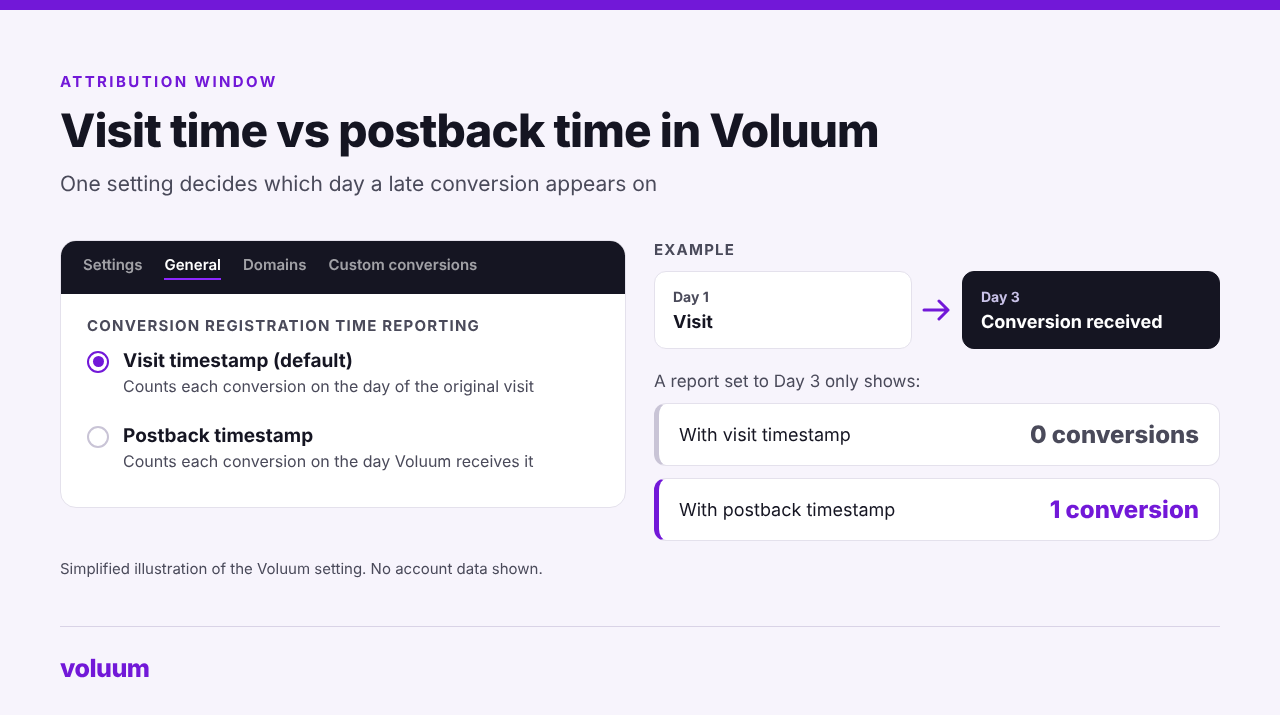
Visit time is the better lens for judging which traffic actually worked. Postback time lines up more closely with what your affiliate network or operator reports for a given day, which makes reconciling payouts easier. Whichever you pick, expect your daily numbers to shift when you switch.
The practical takeaway: use the platform’s window to understand how its algorithm sees your campaign, and use your tracker’s window to decide where the money actually came from.
Track Every Conversion, Not Just the Fast Ones
Slow conversions are still conversions. Voluum ties each one back to its original click for up to 180 days and puts every traffic source on the same scale, so you scale what’s profitable rather than what converts fastest. See how Automizer connects Voluum with your traffic sources.
Frequently Asked Questions
What is the default attribution window on Meta?
Meta’s default under standard attribution is 7-day click, 1-day engage-through and 1-day view. A conversion counts if it happens within seven days of a link click, one day of an engagement such as a share or a 5-second video view, or one day of seeing the ad. You can switch the click window to 1 day and turn view-through off for each ad set.
What is the difference between an attribution window and a conversion window?
They describe the same idea under different names. Google Ads calls it a conversion window and sets it per conversion action, while Meta calls it an attribution setting and TikTok an attribution window. In each case, it’s the number of days after an ad interaction during which a conversion can be credited to that ad.
Is a longer attribution window always better?
No. A longer window catches slow buyers, but it also credits conversions the ad may not have caused, which inflates reported ROAS. A shorter window is stricter but can make good campaigns with longer sales cycles look unprofitable. The right length is the one that matches how long your buyers usually take to convert.
Does the attribution window affect how my ads are delivered?
On some platforms, yes. Meta uses the attribution setting both to report results and to optimize delivery toward people likely to convert within that window. On Google Ads, the conversion window shapes which conversions Smart Bidding learns from. That’s why it’s best to choose a window before launch rather than switching it on a live campaign.
Why does my tracker show conversions that my ad platform doesn’t?
Usually because the tracker’s window is longer, or because it matches conversions by click ID from postbacks the platform never sees. Voluum, for example, attributes conversions to the original click for up to 180 days, while Meta stops crediting clicks after 7 days. The reverse happens too: platforms count view-through and modeled conversions that a click-based tracker doesn’t record.


 Facebook
 Telegram


